Network configuration
Use Physical Interfaces, VLAN Interfaces, and Routes and WAN to build Atlaso network desired state while preserving management access.
Interface overview
This verified appliance view provides visual orientation before you begin.
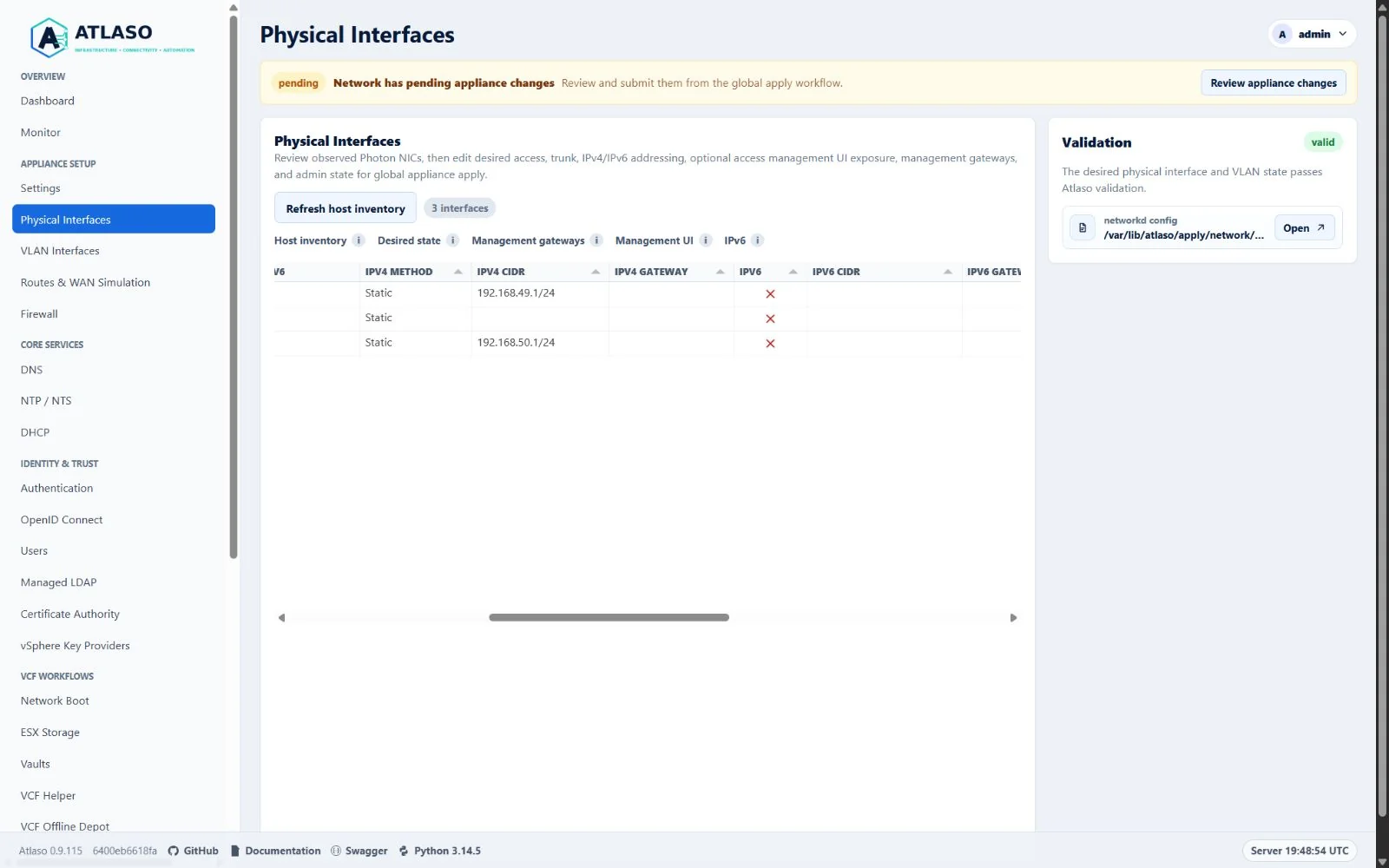
Figure: Physical Interfaces showing the standard Atlaso false glyph for disabled IPv6 and canonical network roles.
Public reverse proxies bind to exact addresses on eligible addressed access or route interfaces and enabled VLANs. Management-role interfaces and trunk physical interfaces are excluded; see the reverse-proxy guide before changing a selected listener's interface or address.
Before you begin
Record the current management interface, address, gateway, and VM network attachment. Keep the local appliance console available. A wrong interface, route, or VLAN can make the web UI unreachable after apply.
Configure the network
- Inspect physical inventory and link state; do not treat an unused interface as failed.
- Create VLAN interfaces only on the intended trunk parent and use the required VLAN identifier.
- Define routes and WAN behavior with explicit interface and network boundaries.
- Review validation and rendered network previews.
- Submit the selected network units through Appliance Apply.
Convert management DHCP to static IPv4
Use Convert DHCP lease to static from the management interface row menu. Atlaso reviews the observed IPv4 CIDR and the usable DHCP-learned gateway from that same interface before saving them as static desired state. Confirm that the address, prefix, and gateway match the intended network; the change does not reach Photon until global Appliance Apply.
If no usable gateway is observed, the review shows none and warns that only same-subnet management will remain. That isolation is allowed when intentional. Clearing a populated IPv4 Gateway cell requires the same warning because off-subnet HTTPS, DNS, repository, and update access will stop after Apply. Off-link gateways and a gateway equal to the interface address remain invalid. Cancel the review or revert the pending Network desired state to retain the applied DHCP address and route; a failed protected management handoff rolls back to the last-applied DHCP path. The first Apply also accepts the appliance's IPv4-only bootstrap nginx listeners. Rollback restores the recorded pre-Apply routing guard even when failure occurs before candidate activation, so an older bootstrap without routing-domain isolation does not acquire an orphaned guard merely from rollback reconciliation.
Dedicated-management connected routes use table 100; Access, Route, and VLAN connected routes use table 200.
Connected routes remain available without a gateway and when forwarding is disabled. A configured management gateway
adds the off-subnet default route. Networkd owns DHCP/IPv6 router-advertisement routes and their expiry in the same
domain tables; the management default also remains available to appliance connections that have not selected a source.
Convert DHCP management to Access
To keep the current management address while moving the interface into the Access routing domain, stage both desired state changes before one global Apply:
- On the management interface row, choose Convert DHCP lease to static. Review the observed IPv4 CIDR and usable IPv4 Gateway; confirm that the address and prefix are intended and the gateway is on-link. This saves static Network desired state only.
- On that interface, change Role from management to access. Keep Management UI enabled. Review the role-conversion summary for the management gateway moved to Routing & WAN. This saves the role and route desired state only; no intermediate Apply is needed.
- Open Review appliance changes and submit Network with its required dependencies and the staged Routing & WAN unit together. Inspect the complete plan before choosing Submit appliance changes. The protected handoff keeps the old management path until the Access path and migrated route are ready.
If either review shows an unexpected address or gateway, cancel or correct the desired state before applying. See Apply appliance changes for review, monitoring, and verification steps.
Reusing a prefix on separate networks
The dedicated management network and a separate lab network may use the same prefix with different appliance addresses.
Atlaso selects local reply routes by the appliance's exact source address, rather than assigning the entire prefix to
whichever interface appears first. An Access interface exposing Management UI still belongs to the lab routing domain;
its off-subnet paths require Routes & WAN configuration. If its domain has no matching route, traffic fails instead of
falling through to a route on the other network. Forwarded lab traffic selects the lab table by its incoming interface.
If that lookup has no matching route, an interface-specific unreachable rule stops evaluation before the main table,
including its management default. Existing firewall and Routing Permission checks still decide whether forwarding is
allowed. These forwarded-traffic rules do not match appliance-local traffic on lo.
After upgrading, Network appears as pending in Appliance Apply even when interface settings are unchanged. Its versioned configuration marker makes this one-time migration selectable. Review and apply Network to install this domain ownership and migrate previous prefix rules. A successful Network Apply clears the pending migration; a failed migration leaves it pending for retry. If an existing access-role Management UI listener has an enabled default route, Atlaso includes Routing & WAN in a protected management handoff. That handoff retains the old route until its lab-domain replacement is ready, then applies the captured WAN configuration. Other migrations use the already-applied forwarding setting and do not apply pending Routes & WAN edits. Rollback restores the prior rules, network files, routing service state, and any WAN runtime included in the handoff. Subsequent WAN Apply uses the applied Network ownership. Older successful WAN and Firewall snapshots may lack the current Routing Permission fingerprint. That comparison metadata alone does not require disabling Routing for this upgrade: Atlaso admits the protected migration with Routing enabled only when saved interface settings and WAN intent are unchanged, apart from revision comments and newly added MAC pins. Existing MAC pins must still match. The handoff installs the new domain rules and commits both enforcement baselines only after success; failure retains the previous snapshots for retry. Genuine Network or Routing Permission changes retain the forwarding-off prerequisite. If an unselected Routing & WAN edit is also pending, apply it separately before retrying the Network migration; the migration does not silently apply those settings. Pending Firewall, Certificate Authority, Appliance Settings, Public Services, and Traffic Publishing edits must be explicitly selected before the protected migration can run. Unchecked protected changes remain pending and prevent task submission. Before the transition guard is enabled, Atlaso records the old listener's observed connected and default routes in the Network transaction, stages any missing copies in its source-selected table, then installs exact rules for proven live sources. It retires only those recorded temporary routes after networkd installs replacements, or during rollback. This preserves gatewayless static and DHCP management access when the older setup has no prefix rule or table-100 route. At boot, the guard is installed even if networkd has not yet created a persisted VLAN; only sources on links already present are seeded, and later reconciliation classifies the remaining links.
The routing service follows DHCP and IPv6 address events and periodically reconciles missed events. Protected Apply waits for address activation and synchronously verifies source rules before readiness. Address changes outside Apply are asynchronous; this is not a guarantee of uninterrupted routing during lease changes. Reusing the exact same appliance IP in both domains is ambiguous and is rejected. Keep distinct appliance addresses even when their prefixes overlap.
If an existing Access interface with Management UI enabled still shows DHCP, use the same Convert DHCP lease to static row action to recover editable static IPv4 desired state. Refresh host inventory first if no address is observed. Startup and UI inventory discovery use a five-second native command timeout while holding writer admission. A failed discovery releases admission without reconciling or changing saved inventory. The confirmation preserves the Access role, Management UI exposure, and IPv6 configuration. It copies only the observed IPv4 address and prefix; Access gateways remain owned by Routes & WAN. Review any required static routes before Apply to avoid losing off-subnet connectivity. Cancel leaves desired state unchanged. After conversion, edit IPv4 CIDR normally, or IPv6 CIDR when IPv6 is enabled, and review the protected management handoff through global Appliance Apply. When this Access interface is the effective management listener, conversion preserves its observed DHCP DNS in empty resolver and DNS-forwarder settings; explicit DNS values remain unchanged. This recovery action does not enable DHCP for new Access configurations.
Assign an interface role
Physical and VLAN interfaces share one role contract:
- management identifies the dedicated management network. Only a physical interface can own management DHCP, default gateways, and management policy routing.
- access identifies an ordinary lab or service network. Access networks require explicit Routing Permissions before Atlaso forwards traffic between them.
- route identifies a lab routing network. Atlaso generates forwarding paths between route-role networks.
- unused keeps an interface outside lab routing and service-listener eligibility.
The retired services and storage choices no longer appear and cannot be submitted through the UI or API.
During an upgrade, Atlaso maps either retired value to access once and preserves the interface's addresses, Admin
Up state, enabled state, and management UI switch. Settings backup export and restore apply the same compatibility map.
Edits from Physical Interfaces and PATCH /api/v1/interfaces/physical/{name} share the same transaction. When an
IPv4 or IPv6 CIDR changes, Atlaso derives the replacement addresses for selected DNS, NTP/NTS, CA, KMS, LDAP, VCF,
ESX Storage, Web Terminal, DHCP, and Network Boot/PXE bindings before committing. A reconciliation failure, including
an existing DHCP range that cannot fit after a prefix shrink, rolls back the interface and every dependent desired-state
row together. Atlaso also rejects address removal, trunk conversion, or administrative disablement while an enabled
service, ESX Storage datastore, DHCP scope, or Network Boot/PXE binding would lose its final eligible address. A
physical parent becoming unavailable also evaluates bindings to its child VLANs. When other selected interfaces remain
eligible, reconciliation removes only the ineligible service, Web Terminal, or PXE selection. Disable or move a final
binding before retrying. Saving still does not change Photon until global Appliance Apply is submitted.
The internal Certificate Authority does not require a public listener. If its last selected portal interface becomes ineligible, reconciliation clears the CA portal interface/address and alias without disabling internal CA custody. Valid operator-selected DHCP gateway, DNS, and NTP values remain unchanged unless they match a replaced interface address or otherwise become stale. Enabled DHCP reservations retain their host offsets when exactly one rebased scope can receive them, including app-owned reservation DNS records; an ambiguous reservation move rolls back the interface edit. Legacy global DHCP binding fields are inactive when real scope rows exist and do not block unrelated changes. The saved interface, all reconciled dependent rows, and the value-free audit event commit together. The audit detail names only dependent units whose desired state changed; a reconciliation or audit-staging failure leaves no partial interface, dependency, reservation, DNS, or audit update.
Physical Interface autosave also validates management continuity in this shared UI/API transaction. Atlaso rejects an
edit that would remove the final complete management candidate and explains that a dedicated management role or an
enabled, addressed access-management listener must be configured first. A successful save changes desired state only;
it does not change which requested interface may serve /ui/management.
Choose where the management UI is available
A physical interface with the management role always exposes /ui/management; it has no separate management UI
switch. An addressed physical interface with the access role and Access (untagged) link type, or an enabled
access VLAN, can additionally enable Management UI. The interface remains an ordinary access network: it stays
eligible for public services and access service bindings, and it keeps access routing rather than gaining a
management-specific gateway or policy route.
Atlaso accepts that flag only when the access interface has a configured or observed usable non-link-local address. An unaddressed or link-local-only interface cannot satisfy management lockout protection because no management HTTPS listener can bind to it.
The default configuration remains eth0 as the dedicated management interface with the switch disabled on all access
interfaces. To use one network for both planes, change eth0 from management to access; Atlaso enables its management UI
switch as part of that conversion. Before saving, the review lists each static IPv4 or IPv6 management gateway that
will leave the management-only fields. Atlaso stages an enabled family default under Routing & WAN on the
converted access interface, reuses an equivalent saved default without duplication, and blocks the complete edit when
a different default already owns that family. If no prior gateway exists, the review warns that Atlaso will not invent
one and off-subnet routing may be unavailable. The interface, route rows, dependent state, and Network and route audit
events commit or roll back together without touching Photon. You may then disable the unused second interface.
For a flagged management listener, Apply installs that default in both lab table 200 and the main table. The main-table
copy lets appliance-originated traffic select the preserved gateway before Linux has selected the listener's source
address. Atlaso also records the applied WAN config in a boot replay unit so both routes return after restart.
Converting an access interface to management clears its switch because management exposure is inherent in the role.
Atlaso permits at most one dedicated management-role physical interface. It also prevents desired state with no
effective management browser path: when no dedicated role exists, at least one active access interface or enabled
access VLAN must have Management UI enabled. Multiple flagged access interfaces are allowed. On a flagged access
address, / prefers the management sign-in, /ui/management requires normal authentication, and /ui/public remains
available for the same access network. The listener also preserves the complete authenticated management front door,
including stable API, API documentation, manifest, and service-worker routes required by the management UI and PWA.
The same effective listener admits ordinary bootstrap-administrator SSH on TCP/22, so moving management to a flagged
physical interface or VLAN does not remove key- or password-backed recovery access. The configured Firewall Source
Group applies unchanged to TCP/22, TCP/80, and TCP/443. Atlaso does not open SSH on unflagged access networks, and this
firewall admission does not enable root SSH; root login remains the separate Appliance Settings policy.
When an Apply changes an effective management interface, address, gateway, or listener role, Atlaso automatically
bundles Network with Firewall, Certificate Authority, Appliance Settings, and Public Services. The old management path
stays active while the candidate network, policy routes, firewall, certificate/nginx configuration, Atlaso loopback
upstream, and host-facing /openapi.json complete bounded readiness checks. Only then does Atlaso retire the old path.
During automatic IPv6 prefix renumbering, native observation retains every preferred dynamic address. Management
Settings and certificate SANs include both active prefixes until an address becomes deprecated or expires.
Applied browser and Web Terminal bindings use the last-applied IPv6 mode; saving a pending disable or static
address does not replace the automatic addresses still served by the applied listener. Native inventory refresh also
uses that applied mode, retaining every preferred automatic prefix across pending edits. Applying disabled mode
clears those observations on the next refresh. The
automatic set has deterministic numeric address ordering, so kernel enumeration changes do not trigger reissuance.
The physical-interface API preserves host_ipv6_cidr as the first observation and returns the complete set in
host_ipv6_cidrs; disabled or static IPv6 does not retain automatic observations.
This runtime set is excluded from settings archives and must be acquired again from native inventory after restore.
When the desired role conversion also staged a management-gateway default, Routing & WAN joins that same
recoverable handoff. Its candidate and last-applied rollback configs are validated before mutation; failure restores
the prior lab routes and the old management path together. Adding, editing, disabling, or removing a default on an
already-applied flagged management listener also starts this handoff even when Network itself has no pending edit.
When an operator selects another Routes & WAN change alongside a protected management change, Atlaso executes and
commits that captured WAN snapshot inside the same transaction rather than advancing its baseline separately. The
candidate WAN runtime is deferred until previous-path retirement, so candidate readiness retains the known-good
main-table default. Rollback explicitly removes any candidate-only mirrored default before restoring prior WAN intent.
Before that commit, fresh requests and existing sessions continue to use the last-applied Network binding paired with
observed addresses. Unapplied access-management flags do not publish a new administrative listener, and unapplied role
or address edits do not demote the old listener to /ui/public. Cancelling, reverting, or rolling back the candidate
therefore leaves the previous management browser path authoritative and the pending desired state recoverable.
A fresh first Apply submits all 17 initialized components, but an unchanged Network snapshot does not invoke this protected handoff. Its ordinary Appliance Settings step proves the existing Atlaso loopback upstream, reloads nginx without restarting Atlaso, and proves the guest-local front door before Network begins. A failed proof restores the prior nginx and systemd configuration and stops the sequential task; it is not treated as a reconnect delay. The ordinary front-door snapshots are durable before nginx publication, so Atlaso startup also restores them after a reboot or helper interruption and refuses to start while that recovery is incomplete.
Only a dedicated management role owns management DHCP, default gateways, DHCP resolver recovery, and isolated management policy routing. If that role is absent, flagged access interfaces retain their normal access routes. The appliance FQDN and managed HTTPS certificate cover every effective management UI address.
Management-to-lab and lab-to-management forwarding remain prohibited. Service listeners and firewall rules must bind to the same intended interfaces.
Configure routes and WAN behavior
Static Routes and Routing Permissions solve different jobs:
- A Static Route selects a path to an IPv4 or IPv6 destination through a non-management interface or VLAN. It owns either a default-route family or destination CIDR, the next-hop gateway when required, output target, metric, enabled state, and optional interface-level WAN policy.
- A Routing Permission authorizes forwarded traffic from one non-management interface/VLAN network to another. Route-role networks allow these paths automatically. Access networks remain blocked until an explicit allow is enabled. An explicit deny overrides the generated/default result for only the selected direction and IP family; the reverse direction has its own decision. Management is never an eligible source or destination. An explicit Routing Permission may also select the same non-management interface for source and destination to authorize that interface as a gateway: packets arriving from its configured source prefix may leave through that same interface toward routed destinations. This is a reviewed forwarding permission, not an automatic route-role permission or a new interface role.
Use the bottom add row in each tab to open the shared reviewed wizard. Double-click a saved row or use Edit in its row menu to update it. The standard step rail remains beside the form on wide screens and adapts to the narrow layout. Each wizard retains entered values while moving backward, validates before Review, and saves only after the final add/update action. A saved row's Enabled value remains directly editable; this changes desired state only. After an inline Routing Permission change, the grid refreshes its desired and effective state in place. Older refreshes cannot replace the latest edit, generated permission rows, or interface choices. If the save succeeds but the refreshed state is unavailable, reload the page as directed by the error message.
Generated route-role permission rows stay read-only. Use their row action to open the Routing Permission wizard and save a persistent override for the selected source, destination, and IP family. The override does not change the underlying interface roles or generated topology. Automatic follows the defaults: route-role pairs allow forwarding, while Access networks need an explicit allow. Allow requests forwarding, and Deny blocks it. If an allow and deny cover the same directed pair and family, deny wins. Choose IPv4, IPv6, or both families; a rule for one family does not affect the other. The opposite direction is evaluated independently.
To route clients through an upstream gateway on the same Access interface, create an explicit Allow permission and select that interface for both Source interface or VLAN and Destination interface or VLAN. Equal interfaces deliberately mean same-interface gateway mode; the permission is limited to the selected IP family and the interface's configured source prefix, and applies to routed destinations across that interface. It is not limited to packets addressed to the upstream gateway itself. Automatic never grants this same-interface path, including on a Route interface. Atlaso does not infer source NAT for it.
If you first need to convert a dedicated management interface to Access with Management UI, keep Routing off and complete that protected Network handoff before enabling Routing. Then review the lab default and permission and apply Routing & WAN and Firewall together. The management conversion cannot be combined with enabling forwarding.
For example, with an Access interface at 192.168.1.254/24 and an upstream router at 192.168.1.1, add or review an
IPv4 Default route through gateway 192.168.1.1 on that same interface. Then add an IPv4 Allow Routing
Permission with the interface selected for both endpoints. Configure a client on that subnet to use
192.168.1.254 as its default gateway. The upstream router must have a return path to the client subnet; in this
same-subnet example it can reply directly, so source NAT is not required. Atlaso's own successful internet access does
not prove that forwarded client traffic has a route or permission.
Generated Firewall names for route-role permissions and management isolation use exact, case-sensitive interface identities and direction. Punctuation or case differences between interfaces remain distinct, and regenerating the same topology retains the same names. These rules continue to cover each shared IPv4 and IPv6 network family.
Saved permission changes are desired state. Review pending and applied state in the global Appliance Apply view, then
submit both Routing & WAN (wan) and Firewall together. With Routing disabled, permissions remain saved but
are suspended. To roll an override back, edit its policy to Automatic or remove the override; generated defaults
then apply again after the paired Apply succeeds. The applied baseline changes only after successful apply, so a
pending or failed apply must not be reported as active forwarding policy.
Same-interface gateway permissions require Routing to be enabled, Firewall to be enabled, a valid reviewed lab route,
and a successful paired Routing & WAN and Firewall apply. Removing or disabling the permission restores the
generated per-interface deny ahead of established-flow and broad forwarding accepts. Test with a new connection
after each change; do not use a retained connection to infer whether a permission was removed.
Browser permission creation, edits, and deletion save the desired-state change and its audit event together. If audit
persistence fails, the save fails and the previous desired state remains available for retry.
Disabled permissions can retain an unavailable interface or IP family; re-enabling requires valid current topology.
Permission names must be unique regardless of case and cannot contain line breaks; the browser wizard and API reject
conflicts before saving, so a later Apply cannot fail on two names that differ only by capitalization.
Descriptions remain readable in desired state; Apply flattens line breaks to spaces in the generated WAN configuration.
Global Apply automatically pairs WAN and Firewall when permission state changes. An active deny, including the
automatic Access default, requires Firewall to be enabled. Access defaults are enforced before broad forwarding
accepts, regardless of the forward-chain policy. The API exposes the same desired and effective state at
GET /api/v1/routing-permissions
(read:routes); POST, complete PUT /{id}, and DELETE /{id} require write:routes. Generated identifiers
cannot be changed. These operations save desired state; they do not apply it to Photon. An explicit API permission
whose source_interface and destination_interface are equal selects same-interface gateway mode; use policy
allow and an explicit ip_family of 4 or 6 (or 0 for both configured families). The same-family configured
source prefix is the ingress boundary, while the applied firewall rule matches the selected family’s routed
destinations with the same interface as ingress and egress. Route-role generation never creates an equal-interface
allow. For example, the existing POST /api/v1/routing-permissions request shape selects this mode without an extra
field:
{
  "name": "Access upstream forwarding",
  "source_interface": "eth1",
  "destination_interface": "eth1",
  "policy": "allow",
  "ip_family": 4
}
Replace eth1 with an enabled, non-management interface or VLAN that has an IPv4 prefix and the reviewed default
route. Continue to use distinct endpoint values for ordinary inter-network permissions.
In the Static Route Path step, Default route and Destination CIDR appear as one peer choice row. Enable
Default route and choose the native IP family IPv4 or IPv6 radio when this path should match every destination
in that family. Atlaso disables and de-emphasizes Destination CIDR while retaining its unsaved value, excludes that
inactive value from submission, requires a same-family next-hop gateway that is on-link for the selected target (or
IPv6 link-local),
and persists the canonical destination 0.0.0.0/0 or ::/0. Review, edit, and table readback show Default route
(IPv4) or Default route (IPv6) rather than making the operator work with /0. Only one default route per family
may be saved; move or edit the existing default instead of creating a conflicting entry.
Leave Default route off for a destination-specific path. The IP-family radios leave the interaction and
Destination CIDR becomes active and required, while Gateway may remain blank when the selected interface or
VLAN reaches that network directly. A supplied gateway must use the same address family as the destination. API
clients remain compatible with POST or PATCH /api/v1/routes requests
that use canonical 0.0.0.0/0 or ::/0; those payloads must also include the required same-family gateway.
Source NAT and port-forward rules live on Traffic Publishing. That guide covers dual-stack wizards, explicit ingress, fixed SNAT, exact destination mappings, eligibility, upgrade, and boot recovery. Routing & WAN retains static routes, routing permissions, and interface-level WAN policies.
After global Appliance Apply, inspect nft list table ip atlaso_nat: every masquerade rule must contain iifname and
oifname, plus an IPv4 source expression only when configured. Verify traffic from selected and unselected ingress
networks separately. To retire translation, disable the rule and submit the global changes; the saved scope remains
available for later review.
The WAN Policies wizard groups delay/capacity settings separately from packet loss and error effects. Assigning a policy to a Static Route identifies its target interface or VLAN; WAN Simulation v1 impairs all traffic on that target, not only traffic matching the route destination.
The Routing & WAN Settings card controls Routing and WAN Simulation. Routing owns explicit lab static routes,
forwarded lab ingress rules, routing permissions, and IPv4/IPv6 forwarding. Connected routes and exact local-source
rules remain active in both routing domains while Routing is off, preserving appliance replies without enabling
forwarding. WAN Simulation independently owns saved tc/netem assignments. Traffic Publishing owns
NAT enablement and remains suspended while Routing is off. When Routing is on, Apply checks the 100-interface
lab ingress rule capacity before changing candidate networking; Routing off needs no lab ingress rules.
Fresh installs and factory reset start all switches off;
disabling them preserves their saved rows. Saving does not change Photon. Submit the Routing & WAN (wan) and
Traffic Publishing (nat) units through global Appliance Apply after reviewing their configuration.
The Routing row on the Services page and local console changes the same saved Routing enabled switch. Direct
Routing start, stop, and restart actions are unavailable because runtime forwarding changes only through Appliance
Apply.
Add or edit a VLAN interface
The VLAN table is a read-only browse surface. Select + Add VLAN interface here to create a row, or double-click an existing row and use Edit VLAN from its context menu to revise it. The shared wizard reviews the complete VLAN record in five steps:
- Select an available trunk parent and VLAN ID; Atlaso derives the read-only
<parent>.<VLAN ID>interface name. - Enter a valid IPv4 CIDR, IPv6 CIDR, or both, then confirm the MTU from
576through9000. A new record starts with the selected parent MTU. - Select the VLAN role.
- Confirm Admin Up. It is enabled by default for a new VLAN and preserves the saved value when editing.
- Review the full desired-state change and save it.
The parent and VLAN ID must be unique. A VLAN whose previously saved parent is now missing may remain saved only while
disabled; select an available trunk before enabling it. Recoverable validation or server errors leave the wizard open
with its entered values. Saving refreshes validation and the configuration preview but does not change the host. Use
global Appliance Apply with the network unit when the reviewed desired state is ready for enforcement. Delete
remains a confirmed row-context action.
Check for duplicate IP addresses
Physical Interfaces and the VLAN addressing wizard expose Check for duplicate IP addresses. It defaults to enabled, including when an older database or settings archive lacks the field. Explicit opt-outs survive edits, upgrades, and backup/restore. Saving changes desired state only; use Appliance Apply with Network selected to activate the policy. An upgrade does not silently reconfigure existing host interfaces.
On Ethernet and tagged VLAN links, static IPv4 uses systemd-networkd ARP address conflict detection
before activation. Management DHCPv4 sets networkd's SendDecline=yes to request decline and retry
of a rejected offered address. Photon systemd 257.13 native testing confirmed conflict rejection
and rollback, but did not observe DHCPDECLINE or a replacement lease. This known limitation is
tracked in #840; do not rely on automatic lease
replacement on that build. Atlaso retains SendRelease=no during reconfiguration.
Turning this setting off disables these IPv4 checks for that interface. It never chooses a replacement
static address. The helper requires systemd 252 or newer and a usable Ethernet identity before
installing an enabled IPv4 candidate; unsupported or unavailable evidence produces Unable to check.
Photon logs static IPv4 ACD rejection at debug level. Image provisioning and worker startup prepare
an Atlaso-owned networkd logging drop-in and enable debug logging on the running service without
restarting networking. The drop-in persists across reboots. This increases networkd journal volume;
Atlaso filters conflict messages before taking its bounded evidence sample and does not retain
unrelated debug messages in address status.
IPv6 is independent: static addresses retain native IPv6 DAD, and existing RA/SLAAC and DHCPv6 behavior continues to use native IPv6 detection. This switch does not enable DHCPv6, disable IPv6 DAD, or change router-advertisement policy. An address on a different link or VLAN is not, by itself, evidence of a conflict. Native detection can miss a silent, offline, or isolated peer; an active address is not proof of global uniqueness.
The Address status column refreshes while the page is visible. The VLAN wizard also shows the
selected row's evidence. Checking, IP conflict, Addresses active, and Unable to check
distinguish tentative addresses, confirmed rejection, observed activation, and missing/stale evidence.
A declined DHCPv4 offer stays a confirmed conflict until a replacement DHCP lease becomes active;
a retained static address does not count as that replacement. Once resolved, the historical decline
does not become a current conflict again merely because a lease later disappears. Missing native
networkd evidence blocks Apply before configuration installation, including with IPv4 checking disabled.
If an ordinary Network Apply fails during installation or address readiness, Atlaso restores the
previous networkd files and reconfigures the previous links. Address readiness allows a 30-second
window for DHCP or IPv6 autoconfiguration. Old VLAN deletion waits until candidate
readiness succeeds. An incomplete rollback reports failure and retains its backup location for
operator recovery; it never advances the applied baseline.
Static readiness requires the complete address and prefix with native static-source evidence;
an old DHCP lease or an address with a different prefix cannot satisfy it.
Apply retains confirmed native failures with the observed interface or VLAN-parent identity before
rollback removes a candidate-only VLAN. The next status refresh can therefore show the failed attempt
even if the worker never sampled that transient link.
After observing a NIC or VLAN-parent replacement, status ignores name-only journal events from
before that observation. A bounded history of the 256 most recently observed names preserves identity
boundaries across polls
where a resource is absent. The boundary persists across refreshes so old events cannot be reassigned
to the replacement hardware. Identity-bound Apply evidence and subsequent native events remain usable.
Backup disposal failure after successful activation is reported as a cleanup warning with the
retained location; Apply remains successful so the baseline matches the installed configuration.
Existing SQLite and PostgreSQL databases gain the enabled setting during serialized schema startup;
later startups preserve saved opt-outs.
Ordinary Apply writes a durable transaction marker before changing networkd files and retains it
with its referenced backups if marker publication becomes visible but directory synchronization fails.
The marker remains until the application commits the exact executed Network baseline. Startup restores interrupted
uncommitted candidates or acknowledges an already committed baseline. Recovery refuses to race a
live helper, and an unresolved marker blocks another Apply. Terminal backup cleanup warnings do
not cause committed configuration to be rolled back on a later restart.
Acknowledgement remains pending until backup removal and durable marker cleanup succeed;
cleanup failure preserves the committed baseline and blocks another Apply until recovery completes.
The worker retries abandoned cleanup once per observation cycle without replaying configuration.
After cleanup succeeds, the interrupted task ends as failed with its applied baseline preserved;
review the task and submit any remaining components. Persistent failures keep the lock and recovery
evidence until a later retry succeeds. Settings restores preserve this appliance's native conflict
resolution and link identity history; that operational history is never exported or imported.
Factory reset durably removes retained native conflict evidence before activating factory defaults,
so an old declined lease cannot reappear as a new conflict after reset.
The same retry queue handles failures in exception recovery. Incomplete address observations retain
the last complete lease comparison and its original timestamp, so a later replacement can prove
recovery without treating an older pre-conflict lease sample as post-conflict evidence.
VMware OVF first boot prepares configuration and deployment credentials before networkd starts.
A second customization stage reloads the management link and verifies native address activation
before recording success or clearing the console review handshake. A conflict or unavailable
native evidence keeps first boot recoverable through network review; it does not finalize the
applied marker. Console corrections survive the preparation stage and are revalidated for activation.
The early VMware preparation service skips appliances with a completed OVF marker on later boots;
the normal customization stage retains its credential cleanup and test-identity republishing checks.
The retained failure names the attempted address, link, and detection time; a conflicting MAC appears
only when the native evidence supplies one. The collector recognizes DHCP rejection and Photon static
IPv4ACD: Conflict on messages, filtering
journal entries before applying its record limit so unrelated debug traffic cannot displace events.
Native networkd rejection messages do not normally include
that MAC, so Atlaso does not infer it from stale neighbor entries.
A rejected management candidate fails Apply and follows the protected management rollback path. The last attempted address stays visible separately from currently active addresses, including a restored working management address. Correct the desired address and apply again. Later successful activation resolves the current warning while retaining the last failure for diagnosis. Runtime observations are bounded to 256 interface records, retained separately from desired/applied baselines, and excluded from settings archives. Evidence older than 30 seconds is marked stale. The worker observes native outcomes at boot and during DHCP/reconfigure activity without issuing extra probes or changing host settings.
A DHCP decline remains a current conflict while an older lease is still active. Recovery requires observing a newly appearing DHCP lease after the decline has been observed; a lease already present in the first conflict sample does not prove recovery. Polling can miss an intervening lease change, so uncertain ordering conservatively retains the warning and the last failed attempt.
Static recovery similarly requires a later activation of the exact attempted CIDR with native static source evidence. A rollback holdover with the same IP, a different prefix, or a DHCP source does not clear the latest failure. When ordering or the attempted prefix is unknown, the warning is retained. This recovery also applies after disabling IPv4 checking: saving the opt-out alone does not clear the warning, but a later observed activation of the exact static CIDR does.
IPv6 recovery remains enabled when IPv4 checking is disabled. DHCPv6 and SLAAC failures remain visible until a later usable automatic IPv6 address appears; an existing address or a new link-local address does not clear the failure. A later outage does not reactivate an already resolved conflict.
Early VMware network preparation is skipped after either OVF customization or non-OVF initialization has completed. The normal post-network customization service still runs to detect a subsequently injected OVF envelope without blocking network startup on unanswered guest-info reads.
Verify and roll back
Confirm the management URL, expected routes, and interface state after apply and again after an appliance reboot. For a
static dedicated-management interface with a gateway, ip route show table 100 must include both the directly connected
management prefix on the interface and the default through the configured gateway; ip rule must select table 100
for that source prefix. A retained address and a successful gateway ping prove neither firewall admission nor the reply
route to a same-subnet host. Verify the Atlaso loopback /openapi.json, the guest-local management front door, and
/openapi.json from the actual management host before declaring recovery.
For a lab default route, run ip route show table 200 and ip -6 route show table 200 as applicable. Confirm the
canonical default uses the reviewed gateway, target, and metric, and separately verify that table 100 still contains
only the management policy-routing state. A successful global Apply stores that exact rendered route in the wan
baseline; a later edit remains pending until the next Apply. When the route target is the effective flagged management
listener, also confirm ip route show default (or ip -6 route show default) names the same gateway and interface, and
that atlaso-wan.service is enabled for reboot replay.
For a same-interface gateway, first verify that Atlaso itself reaches an external IPv4 address and that the reviewed
IPv4 default route in table 200 names the intended upstream gateway and Access interface. From a controlled client on
that subnet, confirm it has only the intended default path, ip route get <external-ip> selects Atlaso's address, and
its neighbor entry for Atlaso resolves to Atlaso's interface MAC. Disable acceptance of IPv4 ICMP redirects on the
test client and remove any learned redirect route before testing; otherwise it may learn to send directly to the
upstream gateway and make a broken Atlaso forwarding path appear to work. Clients on the same layer-2 network can
still choose another gateway themselves; Routing Permissions control packets forwarded by Atlaso and do not enforce
client gateway selection on the LAN.
Open a new connection to a known reachable external IP address, then verify its ingress and egress on the selected
Access interface with a packet capture or the matching generated firewall rule counter. The packet must traverse
Atlaso with the same interface for ingress and egress. If this fails, inspect the client's route and neighbor entries,
Atlaso's table 200, ip rule, the effective Routing state, forwarding sysctls, and the paired applied Firewall and
Routing & WAN policy. Test DNS separately after external IP connectivity succeeds. A successful appliance-originated
request or ping to the upstream gateway alone proves neither forwarding admission nor client return traffic.
As a negative control, disable or remove the explicit same-interface Allow, submit both Routing & WAN and
Firewall through global Appliance Apply, and make a new client connection attempt while confirming Atlaso itself
still reaches the external IP. The client must fail through Atlaso. Restore the permission, apply both units again, and
prove client recovery. Finally, reboot Atlaso and recheck its table 200, service replay, paired applied state, and
client external IP connectivity. Do not diagnose a production incident from this documented example alone: verify the
appliance's actual desired and applied state, routes, forwarding policy, and packet path first.
HTTPS management handoffs check the staged certificate against configured and acquired candidate IPv4/IPv6 addresses before publishing the candidate listener. A previous address retained during the transition stays on its snapshotted old TLS certificate, including when the candidate uses the same public port. Before new addresses activate, the old management listener binds only to verified old addresses, whether the previous site is HTTP or HTTPS. This prevents plaintext access on a newly acquired address and prevents an unmatched old certificate from serving it. After final network reconfigure, every still-assigned address enters the candidate check. A new DHCP or SLAAC address missing from the certificate fails at the certificate prerequisite and restores the previous applied path. Automatic certificate issuance for a newly acquired address is not part of this transaction; restore the static address or use a DHCP reservation covered by the managed certificate before retrying. During the handoff, the candidate nginx listener binds only to addresses already verified against its certificate. Final reconfiguration cannot expose that certificate on a newly acquired address before the final certificate check and listener update. Candidate HTTPS readiness verifies the transaction's CA and address identity before completion.
The committed management site also keeps loopback listeners for console and update readiness. A later handoff accepts those address-scoped listeners as its proven previous site. A wildcard previous site is scoped before new addresses activate. Nginx first enables socket reuse on the existing listener, opens the address-scoped listeners, and returns to the canonical configuration. Each reload must produce a new worker generation; a successful signal alone cannot prove that nginx accepted the new bindings. The existing restart fallback handles a rejected reload, and the protected handoff retains its captured runtime state for rollback.
A failed management handoff reports its non-secret failing layer and rolls back the captured network, coupled Routes & WAN runtime, firewall, nginx, certificate, and service state before the task becomes failed. Rollback also reconfigures interfaces introduced to the candidate and deletes candidate-only VLAN devices. If automatic rollback cannot restore access, use the local console network recovery action to restore a known-good management configuration, then review desired state before retrying.
An unchanged Routes & WAN default may appear as protocol boot (native protocol 3), because Atlaso installs it through
ip route replace. Protected Network Apply accepts that route only on the captured old interface and domain with the
same destination, gateway, and metric. It does not delete it or adopt a different operator route as its replacement.
This applies to dedicated-management table 100 and Access-management table 200, including repeated Apply after an
upgrade. Networkd protocol names and their native numbers are equivalent for route readiness checks.
Management handoff inventories request detailed native JSON because ordinary ip -j route show output can omit the
boot protocol. For comparison, use ip -j -details -4 route show table 200 dev eth0 with the captured family, table,
and interface. A protocol still missing from detailed output remains unknown; Atlaso does not infer boot from omission.
If a route conflict blocks Apply, Tasks and Operational Logs retain management_route_conflict and a bounded expected
and observed route pair: interface, family, table, destination, gateway, protocol, metric, and the failed condition.
The original failure remains separate from dependent rollback or skipped work. Review the pair alongside the applied
Network and Routes & WAN intent; retain operator routes and use the console recovery workflow if rollback is unproven.
Do not disable Routing or remove routes simply to bypass the guard. Confirm loopback, guest-local management, and
management-host access before treating reported rollback as independent recovery evidence.
The WAN cleanup path currently tolerates exit 2 from root-qdisc deletion, including the native message
Cannot delete qdisc with handle of zero. when no removable root qdisc exists. That message alone does not identify a
route conflict or prove successful cleanup. The previous-route conflict guard runs before candidate WAN activation;
use the recorded failing layer, route pair, return code, and recovery outcome to identify the original failure.
Transport ownership
The management Routes/WAN transports and their API v1 counterparts are owned by the dedicated routes_wan domain
routers. The stable UI and API facade modules continue to aggregate and export those handlers. This internal ownership
split does not change any path, method, permission, response, desired-state behavior, or the global Appliance Apply
boundary described above.
Additional verified states
These captures show responsive layouts and useful operational states referenced by this page.
Physical interfaces
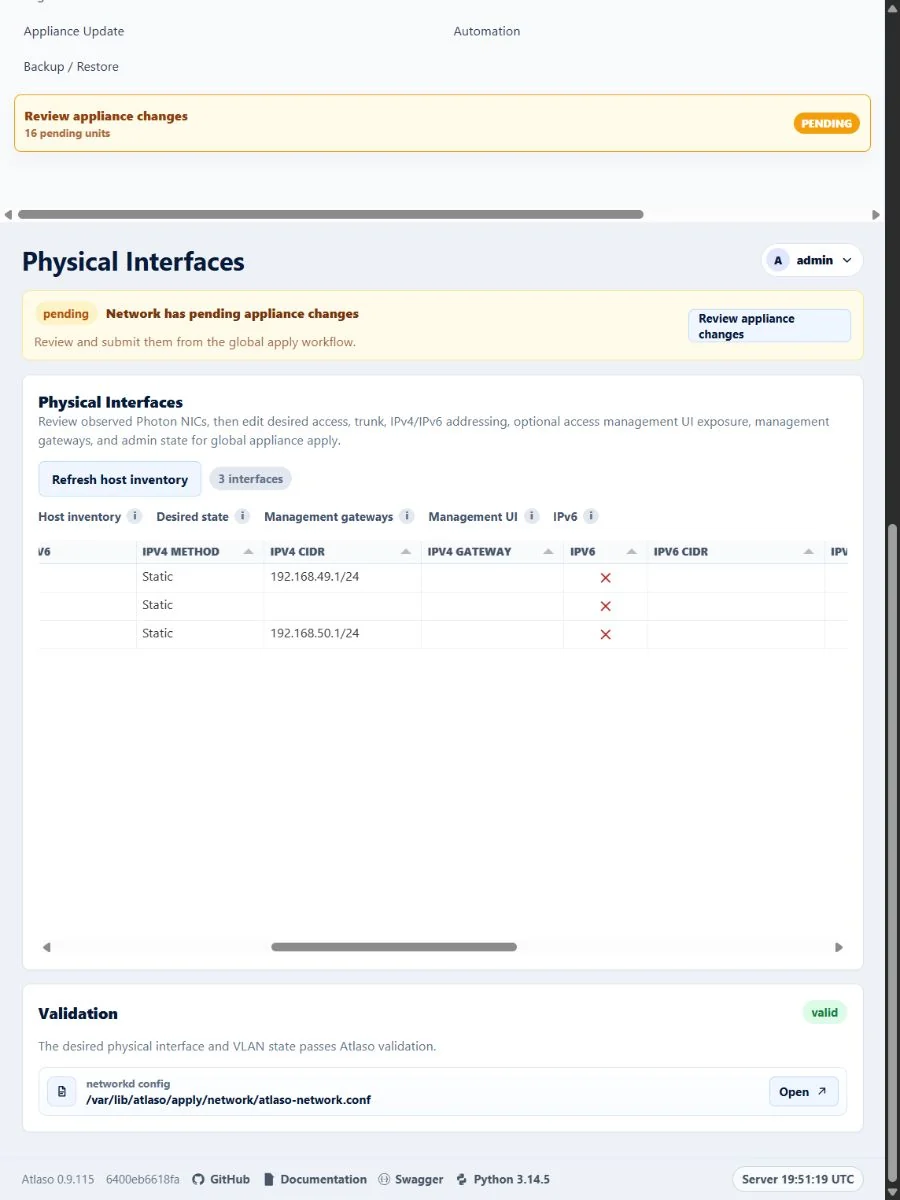
Figure: Physical Interfaces showing the standard Atlaso IPv6 glyphs at the responsive viewport.
Routes Wan: Policies
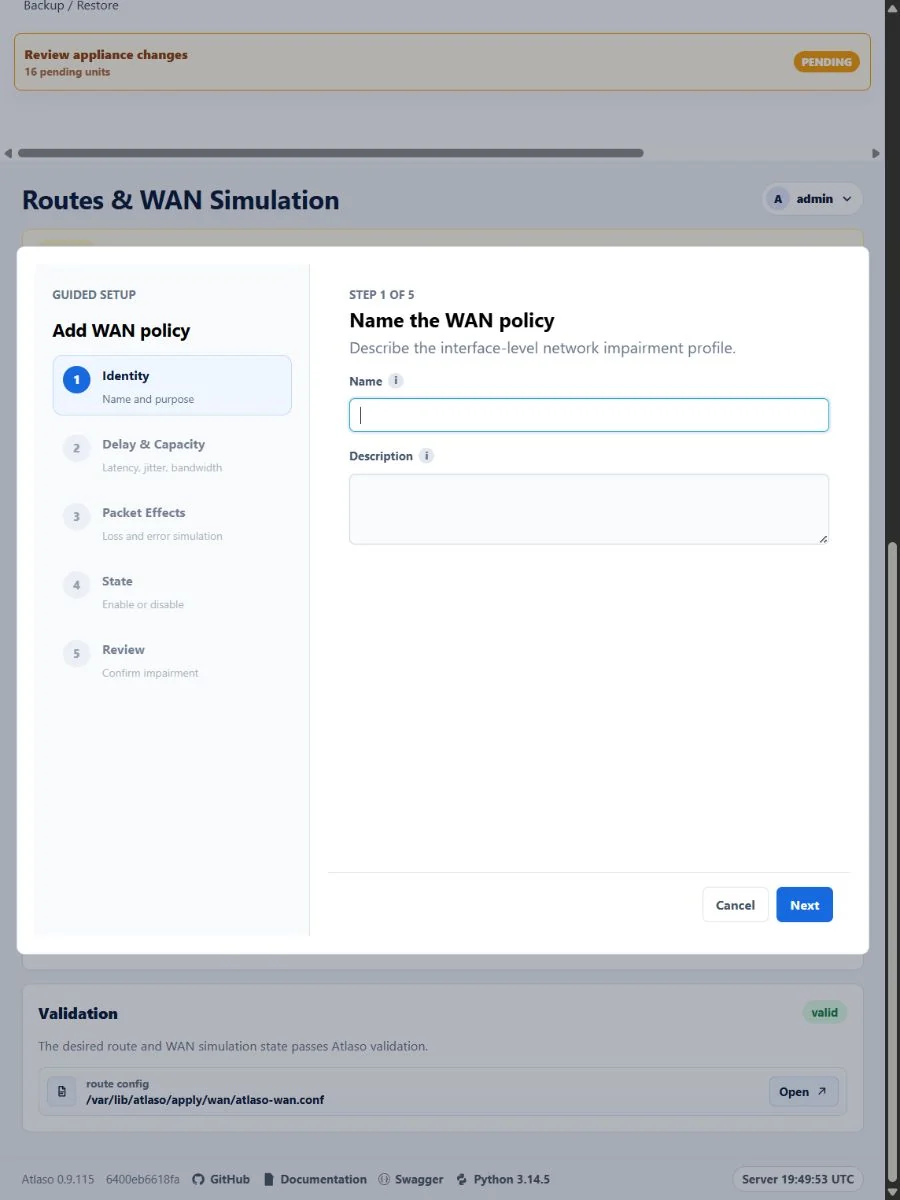
Figure: Shared WAN policy wizard in the verified responsive viewport.
Routes Wan: Routes
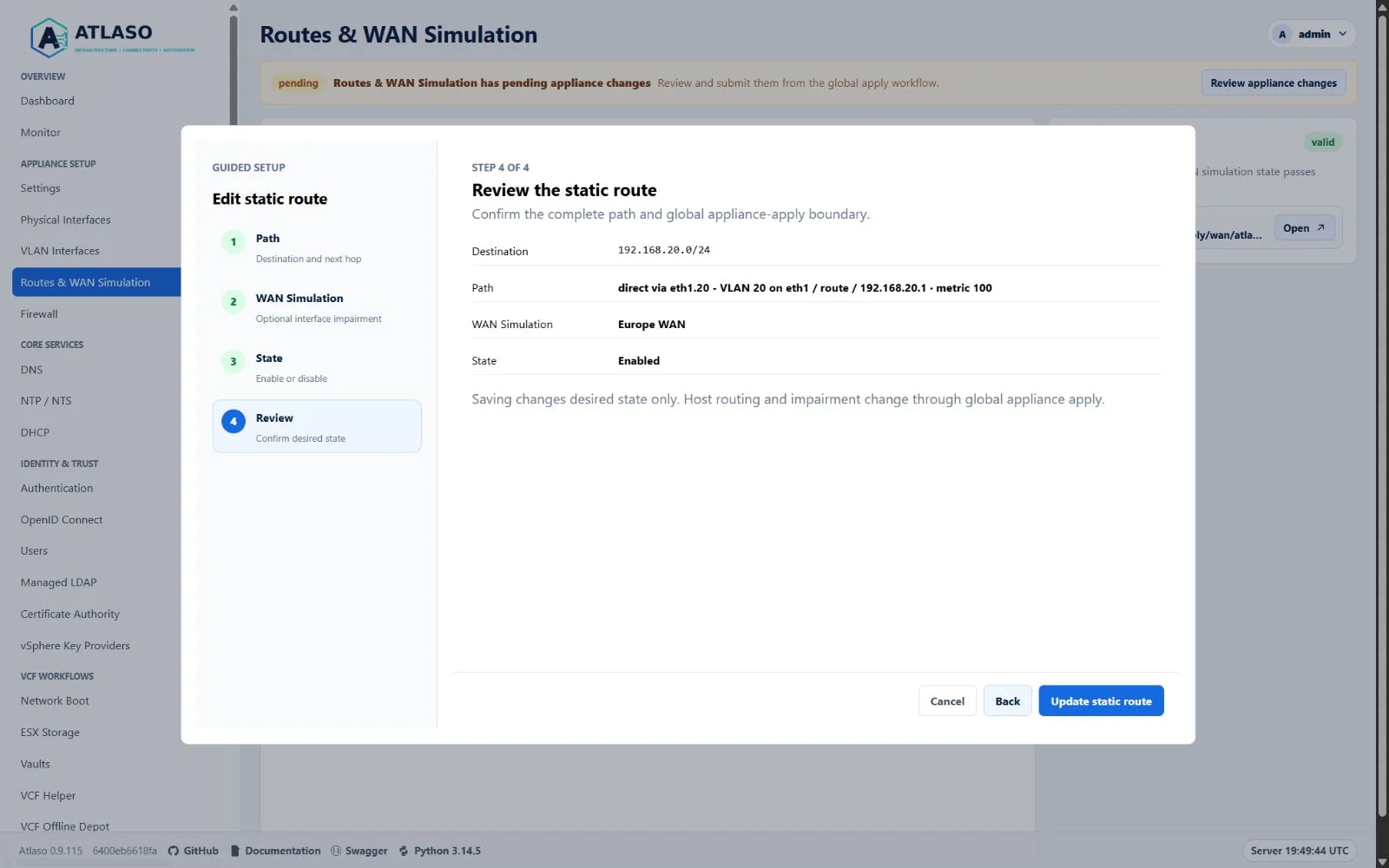
Figure: Shared static route wizard review with the complete path and appliance-apply boundary.
Routes and WAN simulation
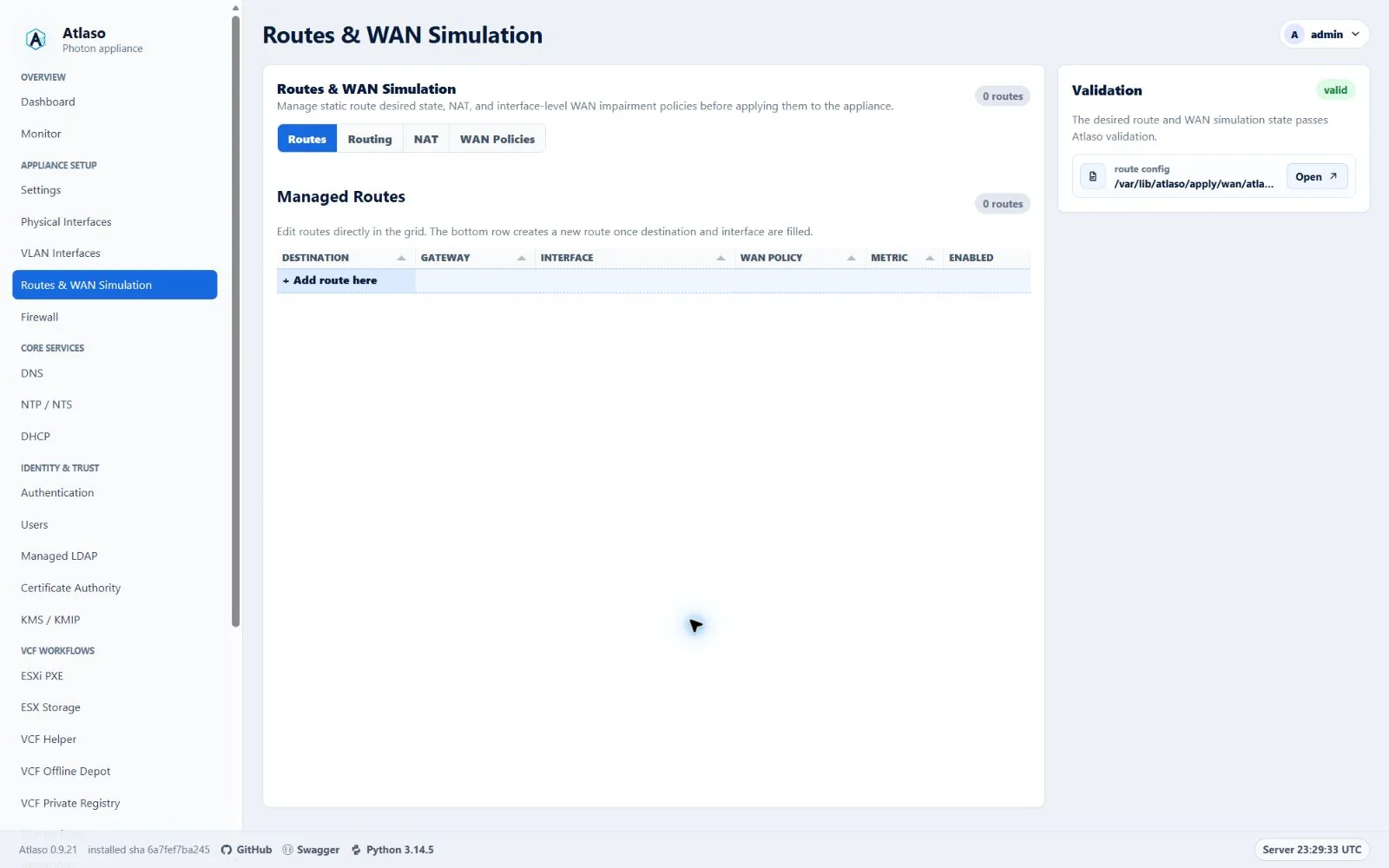
Figure: Routing & WAN owns forwarding and WAN simulation; source NAT is configured in Traffic Publishing.
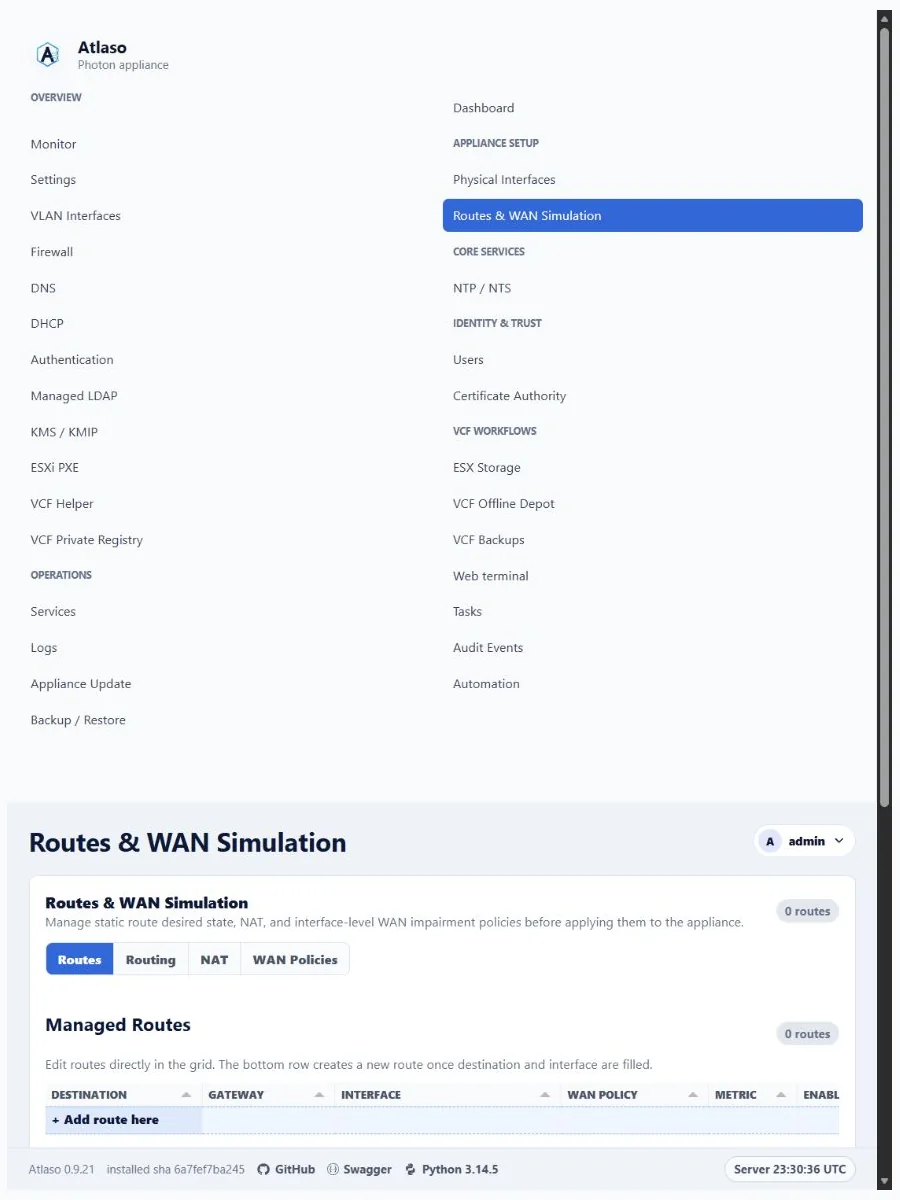
Figure: Routing & WAN owns forwarding and WAN simulation; source NAT is configured in Traffic Publishing.
VLAN interfaces
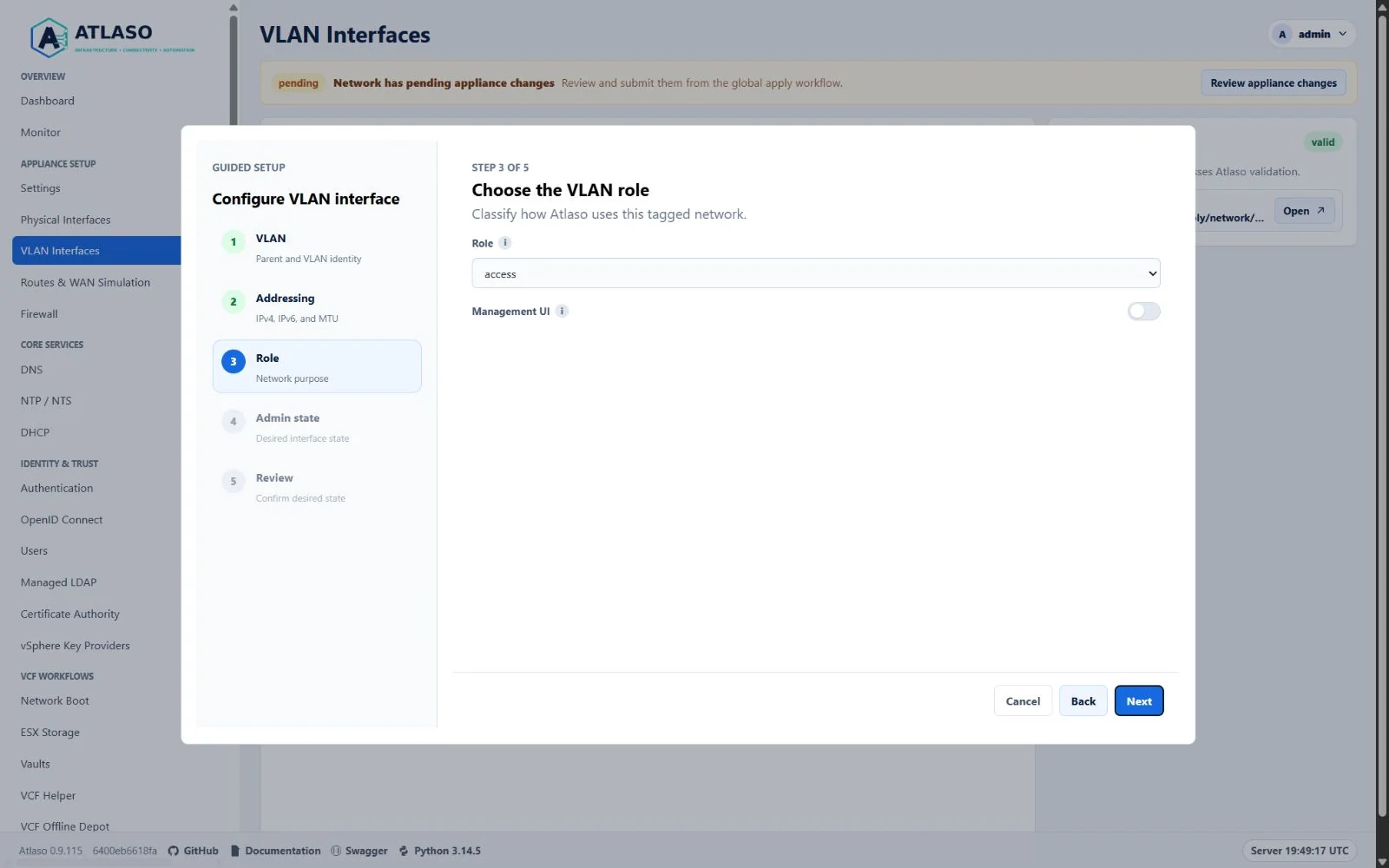
Figure: VLAN Interfaces shared Role step defaulting a new VLAN to the canonical access role.
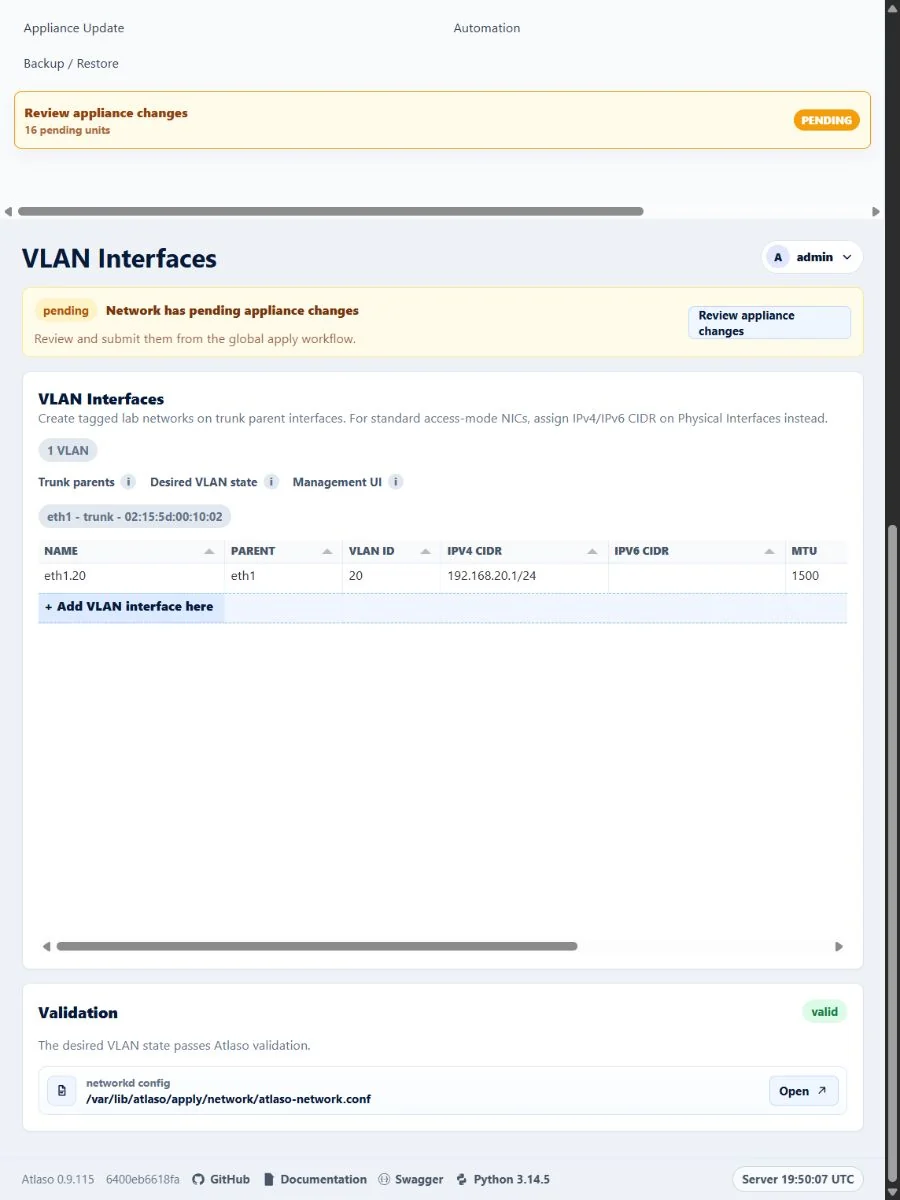
Figure: VLAN Interfaces with canonical role data in the verified responsive state.