vSphere Key Providers
Open vSphere Key Providers at /ui/management/vsphere-key-providers to manage Atlaso's appliance-native KMIP
endpoint. The
listener and server identity are shared appliance-wide, while every provider UUID is an isolated operational key
namespace.
Interface overview
This verified appliance view provides visual orientation before you begin.
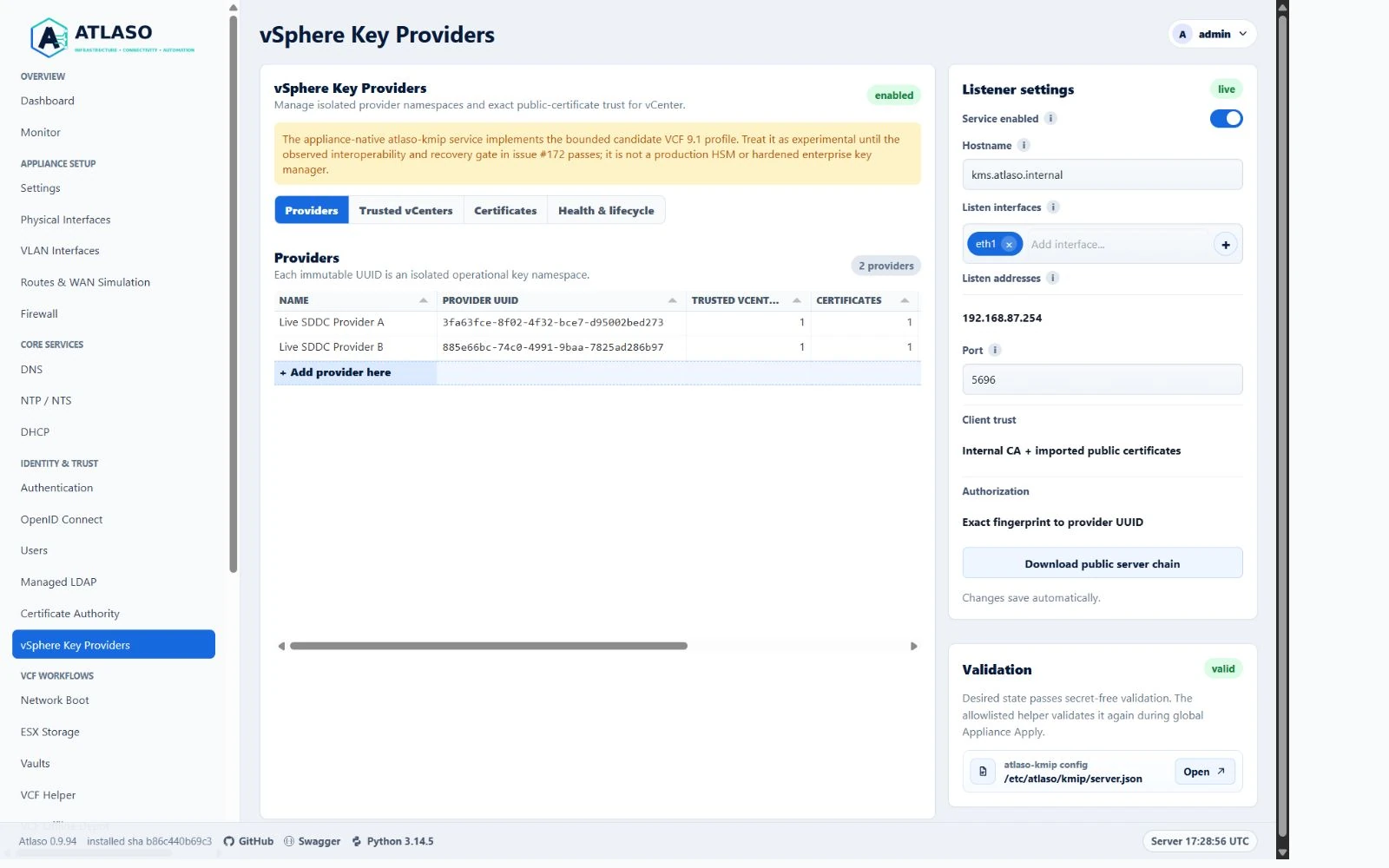
Figure: vSphere Key Providers in the verified clean-appliance desktop state.
Atlaso implements a bounded candidate profile for VCF 9.1. Keep it experimental until the observed interoperability and recovery work in issue #172 is complete. Do not describe the current candidate as observed or supported VCF 9.1 behavior.
Figure: the provider, trusted-vCenter, certificate, and lifecycle tools with listener settings in the right rail.
Add a trusted vCenter
In Trusted vCenters, choose the grid's + Add trusted vCenter here row. The Method step offers two paths:
- Enroll from vCenter discovers the public client certificate using request-only credentials or a saved Vault entry.
- Configure manually starts with the provider, name, optional hostname, and description. Supply an optional public client certificate, then choose enablement on its own final step before Review. Private keys are never accepted.
Both paths use one wizard. Existing rows retain Edit for saved details and Refresh from vCenter for discovery. Review pending changes and run global Appliance Apply before using newly saved trust. The provider and trusted-vCenter count badges track the saved grid rows as they are created or removed, and provider trust counts and trusted-vCenter provider labels refresh in place after the corresponding successful changes. Provider choices reflect saved provider changes immediately: enrollment lists enabled providers, while manual setup can attach a trusted vCenter to any saved provider. Review shows the selected provider and entered vCenter name. Successful setup refreshes the trust rows and pending Apply state in place.
Enroll from vCenter
- Enable Atlaso's Certificate Authority, configure the KMS hostname and listener, and add an enabled provider namespace. Atlaso issues and manages the shared KMIP server certificate from its CA when KMS is enabled. Run global Appliance Apply to deploy the server certificate and listener. Keep the provider's immutable UUID for the later approval step.
- In the VCF 9.1 vSphere Client, add Atlaso's hostname (or a verified applied listener IP described below) and port as a standard KMS/key provider. Use vCenter's Establish Trust controls to trust Atlaso's server identity. The Atlaso listener rail exposes its public server chain. A root-CA trust choice is preferable where vCenter supports it, because vCenter versions that pin only the leaf need trust re-establishment after server-certificate renewal. Confirm the server identity independently.
- In vCenter, make sure the selected KMS cluster has an active client certificate. If needed, create or select it
with Make KMS trust vCenter and complete the vCenter activation step; generating a certificate alone does not
make it available for discovery. The private key stays in vCenter. Use a vCenter account with
Cryptographer.ManageKeyServerspermission for read-only certificate discovery. You can enter it for this enrollment or select a saved Atlaso Vault credential. Saved entries need an authorized HTTPS URI, including any non-default port; entries without one cannot be selected. - In Atlaso Trusted vCenters, choose + Add trusted vCenter here, then Enroll from vCenter. Choose Enter credentials manually or Use a saved Vault credential, then confirm the server address. Manual mode uses HTTPS port 443. A saved URI supplies the hostname and port and keeps the hostname read-only; Atlaso checks that binding before probing or decrypting the credential. URI paths do not change the vCenter API path. Continue to inspect the public HTTPS certificate without authenticating. Compare its SHA-256 fingerprint through an independent trusted source and select the confirmation checkbox; no fingerprint retyping is required. In manual mode, enter the username and password on the Login step; Vault mode skips that step. Atlaso fills the vCenter name from the authenticated configured instance name when available, and loads all returned KMIP cluster IDs. Select the provider and choose a cluster from the editable dropdown, or type a custom ID. You can edit the display name. A custom ID must already be registered in vCenter before certificate inspection can succeed; this wizard does not create clusters. Then review the discovered public KMIP client certificate and provider assignment before approval. Atlaso re-reads both identities on approval and rejects a changed one.
- Review Pending Appliance Changes and run global Appliance Apply for
kms. Until that apply completes, vCenter's client certificate is not usable for KMIP key operations. Recheck the connection in vCenter and confirm that both sides show the trust relationship as established and the provider is healthy/green.
Recover a missing vCenter client certificate
Read-only discovery does not create or rotate a vCenter certificate. If the selected cluster has no active KMIP client certificate, or its certificate value is missing or blank, Atlaso reports that specific recovery condition and directs you to prepare the certificate in vCenter. Malformed or expired certificates remain certificate validation errors; do not treat them as a missing-certificate condition.
- In vCenter, open Configure > Security > Key Providers and select the existing standard provider used for this enrollment.
- Open Establish Trust > Make KMS trust vCenter > vCenter Certificate. Create a client certificate only if one is missing, then complete the activation step so the selected provider has an active certificate. Certificate generation without activation is not sufficient.
- Return to the same Atlaso enrollment wizard with its existing server, credential, provider, and cluster selections. Retry Next to inspect the certificate again. Review the exact public-certificate fingerprint, then explicitly approve it in the wizard. The private key remains in vCenter; Atlaso stores only the approved public certificate.
- Review Pending Appliance Changes and run global Appliance Apply for
kms. Verify the trust relationship from both vCenter and Atlaso, and confirm the provider reports healthy/green before relying on KMIP operations.
This path starts in vCenter and does not require a pre-created trusted-vCenter row or manual public-certificate paste in Atlaso. Manual credentials exist only for the current enrollment requests and are cleared when the wizard closes or the page is hidden, including browser Back-cache navigation; they are not saved to a Vault, provider state, audit detail, task, or browser storage. A Vault credential is referenced by stable vault and entry IDs; its password is never placed in the page. Changing the server or credential source clears certificate confirmation and requires another probe before authentication. Discovery requires the selected vCenter cluster to point only to the configured Atlaso hostname or independently verified applied listener IPs, with the exact configured port on every member. Client authorization remains an exact fingerprint-to-provider-UUID mapping.
The name comes from the configured VirtualCenter.InstanceName setting, queried read-only through
ServiceContent.setting and
Broadcom OptionManager.QueryOptions.
This is the configured vCenter instance label shown in native vSphere inventory/runtime settings. It may be an FQDN
or IP address; it is not inferred from the connection endpoint. ServiceContent.about.name describes the product
(for example, VMware vCenter Server) and is never used as the instance name. The endpoint hostname, immutable
about.instanceUuid, Atlaso provider UUID, and KMIP cluster ID retain their separate meanings.
Reading this setting requires System.Read on the root folder. If the setting is missing, denied, malformed, empty,
or too long for Atlaso's 120-character name field, cluster discovery still runs and the wizard asks you to enter a name.
It never substitutes the product label, endpoint, or UUID. Saved and operator-entered names are preserved, including
on refresh; this correction never renames database records automatically.
Cluster choices use the same pinned authenticated connection and
Broadcom ListKmsClusters
without management-type or status filters. Choosing an entry does not verify its Atlaso endpoint: certificate inspection
still checks every selected cluster member against the supported hostname/IP and exact port rules below.
The Target step reports loading, an explicitly empty inventory, or an actionable failure. Refresh vCenter choices retries discovery without replacing a custom name or cluster ID. Changing the server, credential source, saved URI, login credentials, or TLS confirmation discards discovered choices and any selected value from that inventory; explicit custom values remain editable. Delayed responses from the previous connection are ignored. On discovery failure, retry or enter the name and cluster ID explicitly. Configure manually remains available without a vCenter connection or inventory. Discovery never creates or deletes a cluster, changes keys, approves trust, or runs Apply.
Resolve a Target endpoint mismatch
The VCF 9.1 API represents the KMS server name, transport address, and port as separate fields in
Broadcom KmipServerInfo.
The server name is a display label; matching it to Atlaso's hostname never authorizes a destination. For example,
name=kms.lab.internal, address=192.168.1.254, port=5696 passes only if that exact IP and port are admitted as
Atlaso's applied listener. The provider display name, Atlaso provider UUID/key namespace, vCenter instance identity,
and KMIP cluster ID remain separate. This address check permits public-certificate inspection; it does not establish
reachability, TLS trust, or key-operation interoperability.
If Target reports The vCenter KMIP cluster does not point only to this Atlaso endpoint, discovery stops before retrieving the client certificate. The message names the expected configured Atlaso hostname and port and gives repair guidance. It is identical for all endpoint-check failures, including missing, empty, malformed, or mixed server inventory. It never echoes remote addresses, ports, names, counts, positions, or field-comparison patterns. Inspect the complete cluster directly in vCenter to find the differing configuration.
- Compare the expected endpoint with the hostname and port in the Atlaso listener settings rail. These are saved desired-state values; the message does not prove that the listener is applied, reachable, or trusted. If settings changed, review and complete global Appliance Apply before checking vCenter connectivity.
- In vCenter, inspect every KMS member of the selected standard provider/cluster, including additional members outside the visible row. Each transport address must use the configured Atlaso hostname or an independently admitted applied listener IP, and each port must match exactly. Hostname case and a trailing DNS dot are ignored. IPv4 and canonical-equivalent IPv6 addresses are accepted only when successful KMIP Apply recorded the address, port, and owning interface, the read-only privileged helper confirms the active service's deployed listener configuration agrees with that baseline, the applied Network snapshot pins that owner, and fresh native observation confirms the same usable address on its up interface and pinned MAC. VLANs also require the exact parent, tag, and up links. DHCP and automatic IPv6 require native dynamic-source evidence. An old lease, pending desired-state address, unrelated management address, missing source record, inactive service, or unavailable observation cannot admit an IP. Complete successful Network/KMIP Apply to establish missing ownership, or use the configured hostname. DNS aliases and arbitrary DNS resolution never prove ownership. A cluster containing even one foreign address or wrong port fails.
- Select the intended cluster or correct its configuration through your site's approved procedure. Preserve active providers, keys, certificates, and workloads; do not delete a member, replace a provider, or reset trust merely to clear this message. If the provider is in use or ownership is uncertain, stop and consult its administrator.
- Retry Next from Target. A recoverable rejection retains the wizard inputs. Atlaso re-reads the cluster and checks every member again. Passing this check permits certificate inspection only; certificate approval and global Appliance Apply are still required. A vCenter certificate or connection warning is a separate trust/health condition and does not establish whether this endpoint check should pass.
Certificate fingerprints are normalized SHA-256 values and are unique appliance-wide. The same fingerprint cannot be assigned to another trusted vCenter or provider. Atlaso stores canonical public PEM and parsed public metadata only; it does not generate, accept, export, or reveal a vCenter client private key.
Listener settings accept only currently available addressed access or VLAN interfaces. Atlaso derives the saved IPv4
and IPv6 listener addresses from those selected interfaces; API callers cannot bind the service to an unrelated address
by supplying a different listen_addresses value.
Read health and key counts
Health & lifecycle uses Atlaso status badges and state symbols to distinguish desired state, readiness, runtime, and evidence. Key icons mark the Pre-Active, Active, and Total counts. Labels remain visible alongside the icons. Not reported means authenticated evidence is unavailable; a reported zero remains zero. Configured describes runtime configuration and does not by itself prove that vCenter is connected.
Rotate or retire public trust
Use Refresh from vCenter on the trusted-vCenter row after preparing a replacement client certificate in vCenter. Inspect and approve its new public fingerprint, then apply the overlapping trust bundle globally before switching vCenter to the replacement. Retire the old certificate only after reconnect and key retrieval succeed. If discovery is unavailable during recovery, Add public certificate manually remains an explicit fallback. Atlaso rejects private-key blocks, malformed or expired certificates, CA certificates, and certificates that cannot perform client authentication. An enabled trusted vCenter cannot lose its last usable fingerprint.
Settings backups preserve public certificate history, including certificates that expire after they were accepted. Restore revalidates each PEM body and exact fingerprint while retaining its expired status; an expired record never becomes usable trust merely because it was restored.
Atlaso CA issues the KMS server certificate automatically. On renewal, CA Apply deploys the new certificate and
private key under paths containing that certificate's SHA-256 fingerprint. Appliance Apply then switches the KMIP
service to those paths. Long names are shortened with a hash of the full name so every filename fits the filesystem limit.
The helper checks that the restarted service is active and restores the previous config,
client trust bundle, runtime credential, and service unit if cutover fails. The previous server certificate files
remain available for that rollback.
Before mutation, the helper queries systemd's load, activation, and boot-enablement properties for both units.
Manager failures, transitional states, and unsupported enablement states block apply instead of guessing prior state.
The helper retains the snapshot through six consecutive active-state checks
spaced one second apart; a startup failure during that window triggers rollback. This bounded stability check does
not establish live vCenter interoperability. During upgrade, the helper stops the legacy atlaso-kms.service before starting
its replacement and restores the legacy listener's prior active and enabled state if cutover fails. After a
successful server certificate rotation, refresh the KMS server trust in vCenter as required by its selected KMS trust mode.
If automatic recovery cannot restart the prior service, the helper preserves a root-only snapshot at
/etc/atlaso/kmip/.cutover-rollback and blocks both enabled and disabled applies before runtime mutation.
On the appliance console, inspect
journalctl -u atlaso-kmip.service and the snapshot's state.json. Restore server.json and client-trust.pem to
their matching files in /etc/atlaso/kmip/ with owner root:atlaso-kmip and mode 0640; restore credential to
/etc/atlaso/kmip/atlaso-secrets-key.cred with owner root:root and mode 0600; restore service-unit to
/etc/systemd/system/atlaso-kmip.service with owner root:root and mode 0644. Only files present in the snapshot
existed before cutover. Run systemctl daemon-reload; restart atlaso-kmip.service and check systemctl is-active
if state.json says it was active, otherwise stop it. Independently restore its boot enablement from was_enabled.
Restore atlaso-kms.service enablement from
legacy_was_enabled, and restart it only when legacy_was_active is true; stop the replacement first to release the
shared port. Verify the restored service before removing the
snapshot directory and retrying Appliance Apply. The prior fingerprint-specific server certificate and key remain
at their original paths.
Health and lifecycle counts
Health & lifecycle reports saved provider state, apply readiness, shared-daemon state, and authenticated redacted
counts for Pre-Active, Active, and total operational keys. Counts come from the protected wrapped-key store
through the fixed atlaso-helper kms status operation. If authentication, integrity verification, or store access is
unavailable, Atlaso reports Not reported and null counts; it never substitutes zero.
Disabling the KMIP service retains the operational database and KEK. The read-only status check can authenticate that
retained store using the protected appliance secret even after disabling removes the service's encrypted runtime
credential. This check neither restarts the listener nor recreates its persistent credential. If provider deletion
reports Authenticated zero-key runtime evidence is required before deletion, inspect Health & lifecycle and
run sudo /opt/atlaso/bin/atlaso-helper kms status --real on the appliance. Resolve unavailable authentication or
store-integrity evidence before retrying; never remove the database or KEK to make a provider appear empty.
The helper passes the status credential through a bounded stdin pipe, without writing a temporary credential file or
including the secret in command arguments or the child environment.
Providers without a usable approved client certificate show Enrollment required and are omitted from the runtime namespace until trust is approved. The certificate-only bootstrap listener remains valid.
Operational keys are daemon-owned. No browser or REST operation creates, edits, exports, deletes, or lists operational key identifiers, and KMIP Destroy remains outside the bounded protocol contract.
Removal safeguards
A provider can be deleted only when all of these conditions hold:
- it is disabled;
- every trusted vCenter has been detached;
- the disabled and detached desired state has completed global Appliance Apply; and
- authenticated runtime evidence reports exactly zero operational keys for its UUID.
Atlaso fails closed when empty-store evidence is unavailable. A trusted vCenter can be deleted only after it is disabled and every certificate record is retired.
Disabling a provider creates pending kms Apply work even when it has no approved certificates. Apply that change
before retrying deletion. A rejected deletion keeps the provider intact; correct the reported condition and retry
from the same page. Starting another edit or retry clears the previous action feedback.
Apply and trust-bundle boundary
Saving page or API changes updates database desired state only. Global Appliance Apply renders the enabled providers
with exact enabled fingerprints, configures the daemon on every derived selected listener address, stages
/var/lib/atlaso/apply/kms/server.json and
/var/lib/atlaso/apply/kms/client-trust.pem, and invokes the constrained helper. The helper accepts only those fixed
paths, rejects symbolic links and private-key material, and installs the bundle as
/etc/atlaso/kmip/client-trust.pem with root and atlaso-kmip ownership.
The TLS trust bundle contains the internal CA public root plus imported public leaf certificates. The daemon requires TLS 1.2 or newer, permits X.509 partial-chain verification for explicitly imported leaf trust, and still authorizes the connection only when the peer's exact fingerprint maps to one provider UUID.
API access
For separate passphrase-encrypted operational backups, empty-target import, pending public-trust review, interruption handling, and unchanged legacy-store protection, follow KMIP disaster recovery.
Reads require read:kms; mutations require write:kms. The versioned resources are rooted at
/api/v1/vsphere-key-providers and include listener settings, providers, trusted vCenters, certificates, readiness,
health, lifecycle counts, and the public server chain. See the generated OpenAPI document at /openapi.json for request,
response, authorization, validation, and compatibility details.
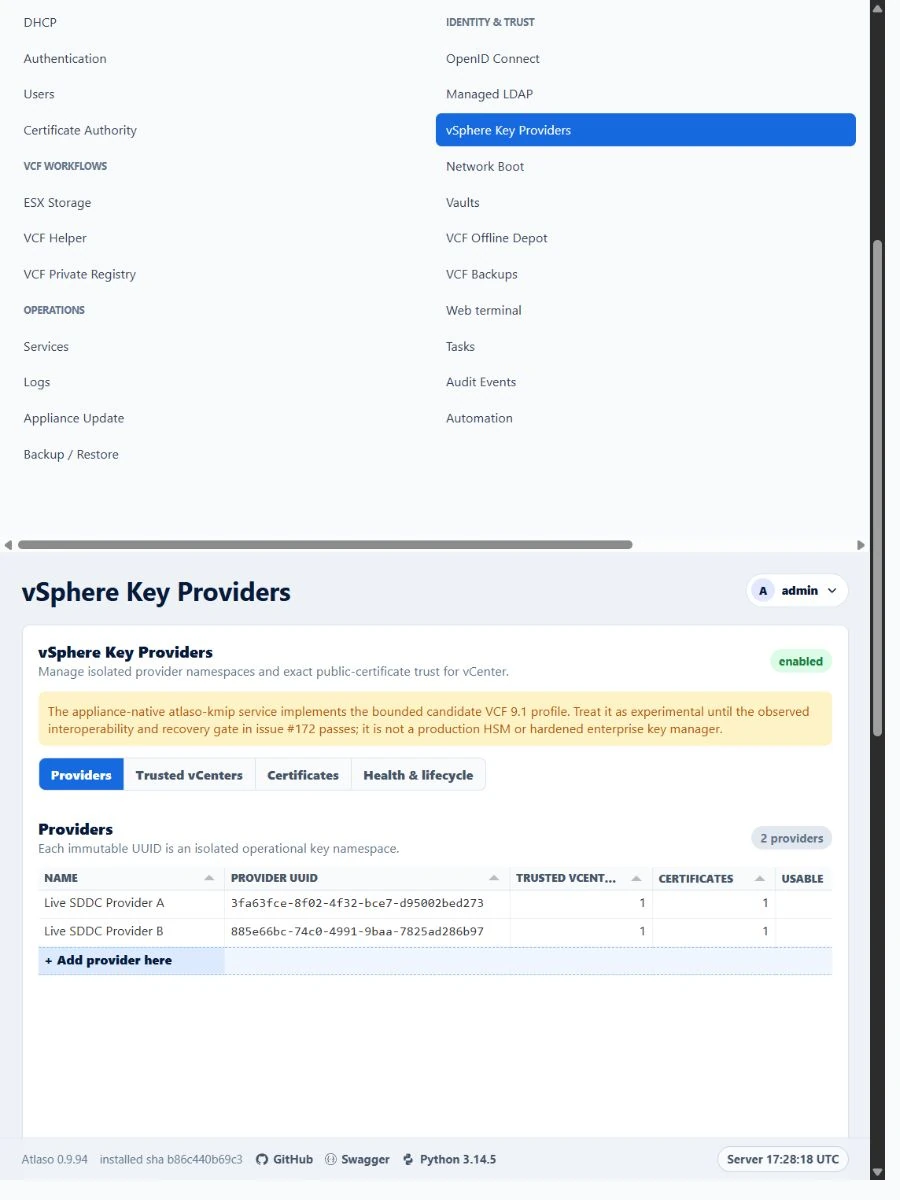
Figure: the wide service frame and DNS-style settings rail in the verified narrow layout.
Additional verified states
These captures show responsive layouts and useful operational states referenced by this page.
vSphere Key Providers
Figure: vSphere Key Providers in the verified clean-appliance responsive state.