DNS
Atlaso manages DNS desired state through dnsmasq. Editing settings, zones, or records changes the control-plane database
and the global DNS/DHCP preview; it does not mutate the appliance until an operator submits the DNS/DHCP (dnsmasq)
unit through Appliance Apply.
Interface overview
This verified appliance view provides visual orientation before you begin.
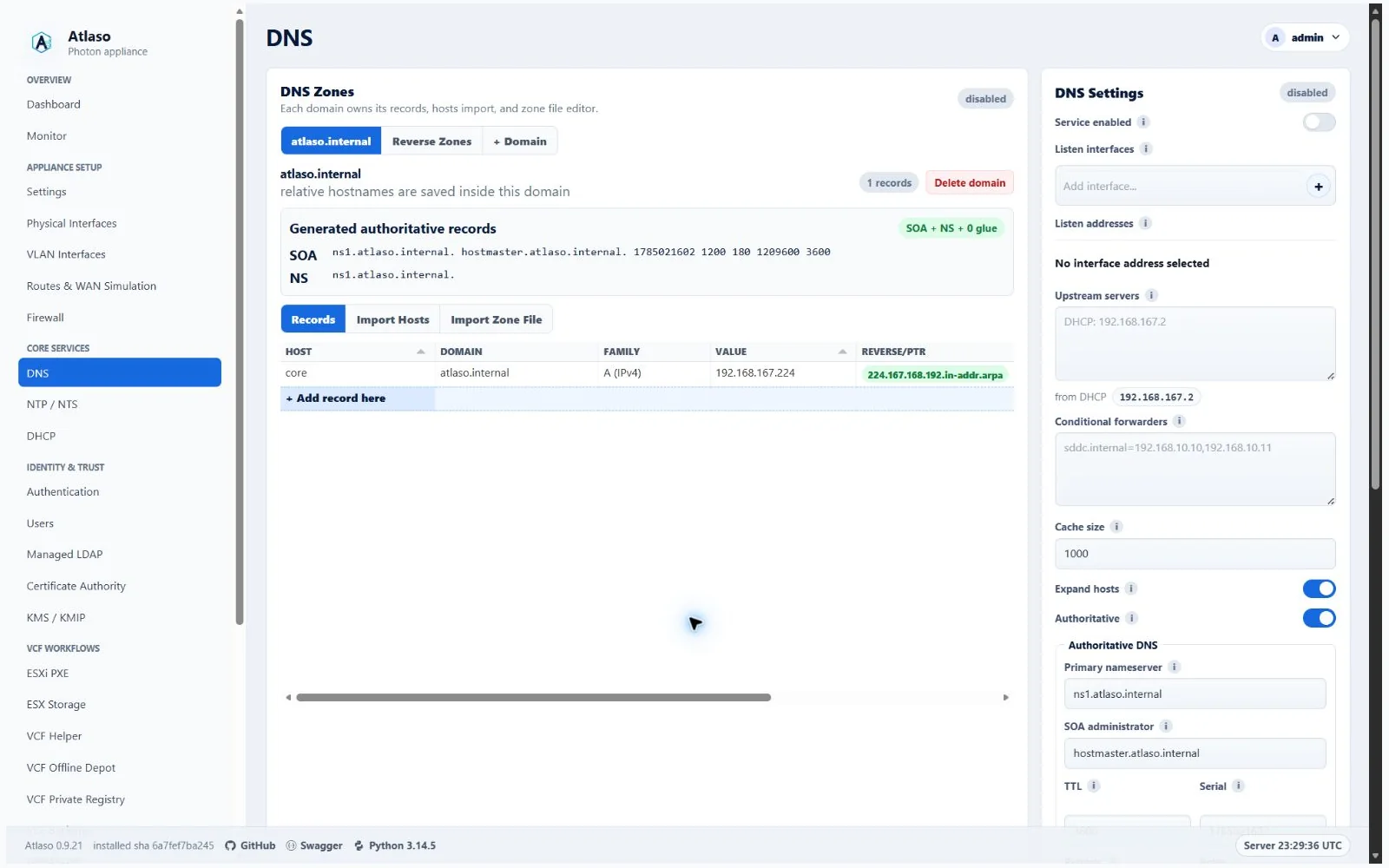
Figure: DNS in the verified clean-appliance desktop state.
Reverse proxies can opt into Atlaso-managed A/AAAA records when their hostname belongs to an enabled authoritative zone. Otherwise the reverse-proxy guide shows the exact listener records to configure in external DNS. Existing operator-owned records are not replaced to satisfy a proxy hostname conflict.
When DNS is disabled and has no selected bind interface, GET /api/v1/dns/settings returns the saved empty
listen_interface. The settings update request still requires a nonempty interface; use DNS validation to review bind
targets before applying desired state. DNS settings changes reach the appliance only through the global Appliance Apply
workflow.
Atlaso-owned service records follow applied listener-address changes automatically. A Network apply includes the
generated DNS dependency for enabled local DNS, proves the new listener is ready, publishes its A/AAAA targets and
CNAME aliases, and checks DNS answers before completing. The separate VCF Depot nginx listener, including a custom port,
also moves and passes socket readiness before DNS publication; unrelated pending Depot settings remain pending.
Network changes also protect active DHCP/SLAAC service sources when configured addresses are unchanged, because native
addresses can change during reconfiguration. Dynamic Public Services listeners use the same protected handoff even when
DNS is disabled or the listener has no generated DNS record. The same DNS-independent protection covers applied dynamic
NTP, LDAP, KMS, and standalone Depot listeners; successful handoffs retain the verified native address observations.
Readback checks retired owned names as well as replacement records. Static handoffs verify the submitted records and
retain that verified ownership even if service identities are edited during readiness checks. Authoritative DNS is queried
through the captured client-facing listeners and its isolated backend, alongside recursive loopback. Appliance-local
resolution must also return a verified service address through getent hosts, and retired generated names must stop
resolving unless replaced by the captured candidate; stale NSS answers trigger rollback.
A failed handoff or DNS check restores the previous Network
and DNS state together. Manual records and unrelated pending DNS edits remain unchanged; custom service hostnames keep
their identity while their owned address targets move.
This covers the appliance FQDN, CA portal, VCF Offline Depot, OIDC, LDAP, NTP/NTS, KMS/KMIP, ESX Storage, VCF Private Registry, and ESXi PXE service endpoints. Console setup and Web UI/API changes use the same global Apply reconciliation; restore and startup refresh the same desired service aliases. Client DHCP reservations and lab inventory names are separate identities and are not rewritten as appliance service targets.
Select + Domain to create a forward domain through the guided identity, enablement, and review steps. Each domain identity includes a full-width multiline description. The selected domain tab presents that description as its heading and keeps the DNS suffix in the supporting line. Each domain places its direct enablement switch at the right of the Records, Import Hosts, and Import Zone File tab row. Disabling a domain retains the domain and all scoped records in Atlaso's database while excluding that zone from rendered dnsmasq desired state; at least one domain must remain enabled.
On wide desktop layouts, each selected domain's records grid expands to the remaining main-column viewport height so larger record sets can be reviewed with less page scrolling. Atlaso recalculates the available height when the window or main panel changes size. Narrow and hidden layouts retain the compact bounded grid height, horizontal overflow remains inside the grid, and the shared bottom Add DNS record row remains available for empty, single-row, and larger zones.
Local and authoritative modes
With Authoritative off, each managed domain renders as local=/domain/. Atlaso answers known local records and
forwards other queries to the configured upstream or conditional forwarders. Existing newline-delimited domain API
values remain supported.
When the management interface uses DHCP and no upstream is saved explicitly, Atlaso uses the non-loopback DNS servers
from that interface's active systemd-networkd lease. This lease fallback remains authoritative after the appliance
resolver has been redirected to local dnsmasq and resolvectl therefore reports only 127.0.0.1; applying DNS must not
regenerate dnsmasq without the DHCP-provided forwarders.
With Authoritative on, Atlaso runs an isolated authoritative dnsmasq backend on 127.0.0.1:5353. The ordinary
dnsmasq service forwards each managed forward domain to that backend and continues to answer clients on every selected
listener. The client-facing cache is disabled in this mode because cached forwarded replies lose the backend's AA flag;
this preserves authoritative positive and negative answers on repeated queries. The same client-facing sockets
retain upstream recursion. All managed zones share one primary nameserver, SOA administrator, TTL, refresh, retry,
expiry, and serial. v1 does not configure secondary nameservers or AXFR. Generated reverse zones remain normal dnsmasq
PTR behavior rather than authoritative reverse zones.
The authoritative renderer emits:
auth-server=<primary-nameserver>,127.0.0.1in the isolated authoritative backend;- one
auth-zoneper managed forward domain; - shared
auth-soaandauth-ttlvalues; - A/AAAA
host-recordglue mapping the primary nameserver to every selected DNS listen address; server=/<managed-domain>/127.0.0.1#5353andcache-size=0in the recursive client-facing service. Authoritative DNS and DNSSEC validation cannot be enabled together: DNSSEC caching removes the AA flag from repeated managed-zone answers. Without Authoritative DNS, DNSSEC keeps at least 150 cache entries as dnsmasq requires.
When DHCP is enabled, leases in a managed DNS suffix update the derived-name directory
/var/lib/atlaso-dns-authoritative-leases, which the authoritative backend can read after dropping privileges.
The DHCP lease file remains under the restricted Atlaso state directory.
The recursive instance forwards those leases' reverse lookups to the backend and keeps generated nameserver glue PTR
records locally. DHCP names in other suffixes retain normal recursive-instance behavior. Atlaso reads the managed lease
names from the mirror for the DHCP UI and API, and reconciles the mirror against current leases, reservation names,
client identities, and reservation provenance before re-enabling authoritative DNS. Departed clients or rolled-back
reservations cannot regain stale A records. Reserved clients still receive their saved hostname through DHCP.
When authoritative DNS is enabled over existing DHCP leases, Atlaso seeds valid active lease names before starting the
backend so clients do not need to renew first. When it is disabled, the recursive listener temporarily serves mirrored
names for active leases whose stored hostname is *; the lease hook removes each mirror when the client renews with an
ordinary name, releases its address, or changes identity. This avoids dropping names during the mode change while
preventing stale mirrors from outliving their leases. A valid DHCP name equal to the managed zone apex follows the same
mirror and reconciliation rules as names beneath that zone.
Each new mirror records the exact DHCP scope domain that emitted it. If a protected management handoff rolls back,
Atlaso preserves valid renewals of existing names under the old scope and rejects candidate names from a different
scope, including nested suffixes that also match the old authoritative zone.
An explicit reservation name in a managed zone suppresses client-supplied names even when its DHCP scope uses an
unmanaged suffix, so the recursive instance cannot learn a competing local answer.
The primary nameserver must belong to a managed domain. Its glue identity is generated and cannot conflict with operator CNAME or A/AAAA data. SOA expiry must be greater than refresh and retry, and all timer values must be positive 32-bit seconds.
Selected DNS listeners answer managed-zone records (including SOA and NS), ordinary PTR queries, and external queries
through the configured upstreams. Listener selections and firewall policy continue to limit client access; Atlaso does
not bind an unrestricted public resolver. The renderer uses bind-dynamic so selected interfaces and addresses can
appear after dnsmasq starts, including VLANs created during Network Apply.
Appliance host resolution
When enabling or disabling local DNS changes the host resolver, select both DNS/DHCP and Appliance Settings
in Appliance Apply. Selecting Appliance Settings approves its complete pending configuration; DNS selection alone is
rejected so unrelated pending settings cannot be applied implicitly. When DNS activation is the only pending edit, the
review still shows the projected Appliance Settings resolver change and selects it together with DNS. The task starts
dnsmasq before directing the host's systemd-resolved resolver to 127.0.0.1 with the catch-all routing domain ~..
DNS startup failure skips the resolver change. Disabling DNS moves the host back to configured external or management
DHCP DNS before stopping local DNS.
If that resolver change committed but the DNS step failed, a DNS-only retry is accepted because the host no longer
depends on local DNS.
The managed networkd file persists the selection across reboot and excludes DHCP/RA DNS while explicit DNS is active.
The systemd-resolved stub in /etc/resolv.conf remains in use; dnsmasq uses explicit upstreams with no-resolv to avoid
resolver loops. Apply restarts dnsmasq because a SIGHUP reload does not reread its configuration.
During a protected management handoff, disabling local DNS moves the resolver first, before replacing the listener;
enabling it starts the listener first. If an ordinary DNS Apply fails after lease reconciliation, removed live lease
names are restored and the authoritative backend is reloaded.
After Apply and again after reboot, compare dig @127.0.0.1 host.atlaso.internal,
resolvectl query host.atlaso.internal, getent hosts host.atlaso.internal, and a Python socket.getaddrinfo() lookup.
For the appliance's exact current kernel hostname, native NSS may synthesize local interface addresses or the
systemd fallback addresses ::1 and 127.0.0.2. Apply accepts these only for a directly owned generated name after
a bounded, network-disabled resolvectl lookup proves exclusively synthetic resolution and its addresses match the
current local address inventory or those exact fallbacks. This exception does not extend to aliases or retired names.
Assigned IPv6 link-local addresses participate in that proof; scoped resolver results must match the address on the
named interface or interface index before an NSS result without the scope can be accepted.
Authoritative and recursive wire DNS checks still require the exact captured published records, and unexpected,
unowned, or stale addresses still fail Apply.
From an allowed LAN client, query local records, SOA/NS, and an external name over UDP and TCP. If DNS activation fails,
inspect the DNS task error and correct listener/upstream configuration before retrying global Apply. To restore external
host resolution, disable DNS and submit the resulting DNS/DHCP and Appliance Settings changes.
Generated zone records and serial
Each forward-zone summary and zone-file export shows the generated apex SOA and NS records plus nameserver glue. The summary uses compact typography so the structural values remain subordinate to the editable records collection. These records are structural and read-only; they are not available in the ordinary record-type selector or stored as duplicate DNS record rows.
Atlaso owns one shared monotonic SOA serial. Zone creation/deletion, record create/update/delete/import, generated-record changes, and authoritative settings or listen-target changes advance it. The serial is exposed read-only in the UI and public DNS settings response and is included in backup/restore and desired-state comparisons.
Factory service identities
Factory-derived service names use the domain portion of the canonical appliance FQDN. For example, an appliance FQDN
of atlaso.lab.internal produces ca.lab.internal, kms.lab.internal, ldap.lab.internal, ntp.lab.internal,
oidc.lab.internal, nfs.lab.internal, esxi-pxe.lab.internal, registry.lab.internal, and
depot.lab.internal. Fresh seed, OVF first boot, factory reset, settings restore, and later appliance-domain changes
all use this rule.
When the appliance domain changes, Atlaso migrates only a packaged default or the exact factory name under the immediately previous appliance domain. A different service hostname is treated as operator-owned and remains unchanged. Atlaso renames or removes only DNS rows carrying that service's exact app-owned marker, including generated IPv4 and IPv6 targets. If the destination name already has an operator-owned record of the same type, Atlaso preserves the operator record and removes the stale app-owned alias instead of overwriting it. The affected service and DNS desired state remain pending until submitted through Appliance Apply.
Zone-file import and export
Zone-file export includes $ORIGIN, $TTL, generated SOA/NS/glue, and all enabled operator records. Import supports A,
AAAA, CNAME, TXT, SRV, MX, CAA, and PTR records. Matching SOA, NS, and glue are accepted and ignored rather than
persisted. Conflicting structural metadata is rejected with guidance to change Authoritative DNS settings. Import
remains scoped to the selected managed domain.
Apply and verification
Review the DNS validation card and rendered config, then submit only the global DNS/DHCP unit when that is the intended
changed unit. The helper stages and validates /var/lib/atlaso/apply/dnsmasq/atlaso.conf, installs the recursive
configuration at /etc/atlaso/dnsmasq.d/atlaso.conf, and, when authoritative mode is enabled, installs the extracted
backend configuration at /etc/atlaso/dnsmasq.d/atlaso-authoritative.conf. It starts
atlaso-dns-authoritative.service before restarting dnsmasq.service.
Both generated configurations use no-hosts: the appliance's /etc/hosts is reserved for local OS identity and is
never published to DNS clients. This prevents a short loopback entry such as 127.0.0.1 atlaso from becoming
atlaso.lab.internal through expand-hosts and hiding the managed appliance address. Explicit DNS records, DHCP
reservations, and the authoritative DHCP lease mirror remain available. expand-hosts still applies to the managed
lease mirror. Appliance-local hostname resolution continues through the OS hosts/NSS and configured resolver paths.
On an applied appliance, verify the installed directives and query behavior:
sudo grep -E '^(auth-zone|auth-server|auth-soa|auth-ttl|host-record=ns)' /etc/atlaso/dnsmasq.d/atlaso-authoritative.conf
sudo grep -E '^server=/.+/127\.0\.0\.1#5353$' /etc/atlaso/dnsmasq.d/atlaso.conf
systemctl is-active atlaso-dns-authoritative
systemctl is-active dnsmasq
sudo grep -x no-hosts /etc/atlaso/dnsmasq.d/atlaso.conf /etc/atlaso/dnsmasq.d/atlaso-authoritative.conf
dig @192.168.50.1 atlaso.lab.internal A
dig @127.0.0.1 -p 5353 atlaso.lab.internal A
getent hosts atlaso.lab.internal
dig @192.168.50.1 atlaso.internal SOA
dig @192.168.50.1 atlaso.internal NS
dig @192.168.50.1 ns1.atlaso.internal A
dig @192.168.50.1 app.atlaso.internal A
dig @192.168.50.1 missing.atlaso.internal A
dig @127.0.0.1 -x 192.168.50.20
dig @127.0.0.1 example.com A
The missing managed name should return authoritative NXDOMAIN with SOA authority. The loopback queries verify existing PTR behavior and configured upstream recursion. Replace addresses and names with the appliance's selected listener and managed data.
For the appliance FQDN, compare the LAN listener's answer from another machine with the direct port-5353 backend
answer on the appliance. Both must contain the applied managed address rather than a loopback hosts entry. Local
getent may follow OS hostname/NSS policy, so it is a separate local-resolution check. Repeat after DNS/DHCP Apply
and reboot; after changing the managed address and applying, verify both wire answers contain the new address and no
stale address. Check an ordinary service record and a live DHCP client name as well.
DHCP upstream preservation
Explicit DNS upstreams always take precedence. When the management interface uses DHCP and upstreams are empty, Atlaso
uses that interface's observed DHCP resolvers as dnsmasq forwarders. Local DNS intentionally changes
resolvectl dns <management-interface> to loopback; after that transition Atlaso recovers the original resolvers from
the exact systemd-networkd lease identified by the management interface's ifindex. Loopback, duplicate, malformed,
unscoped IPv6 link-local, and other-interface lease values are excluded. Link-local lease values cannot be used safely
because the lease does not retain the interface scope required to reach them.
Every later global appliance apply, including an apply caused by enabling or disabling Web Terminal, reuses the same
effective forwarders. If DHCP fallback is required and the management lease has no usable resolver, DNS/DHCP validation
fails before dnsmasq is changed. Restore or renew the management DHCP lease, or configure explicit upstreams, then
review and resubmit the DNS/DHCP unit. After apply, confirm both an Atlaso-managed name and an external name resolve with
getent hosts or direct dig @127.0.0.1 queries.
Transport ownership
The management DNS transports and their API v1 counterparts are owned by the dedicated dns_dhcp domain routers.
The stable UI and API facade modules continue to aggregate and export those handlers. This internal ownership split
does not change any path, method, permission, response, desired-state behavior, dnsmasq rendering, or the global
Appliance Apply boundary described above.
Additional verified states
These captures show responsive layouts and useful operational states referenced by this page.
DNS
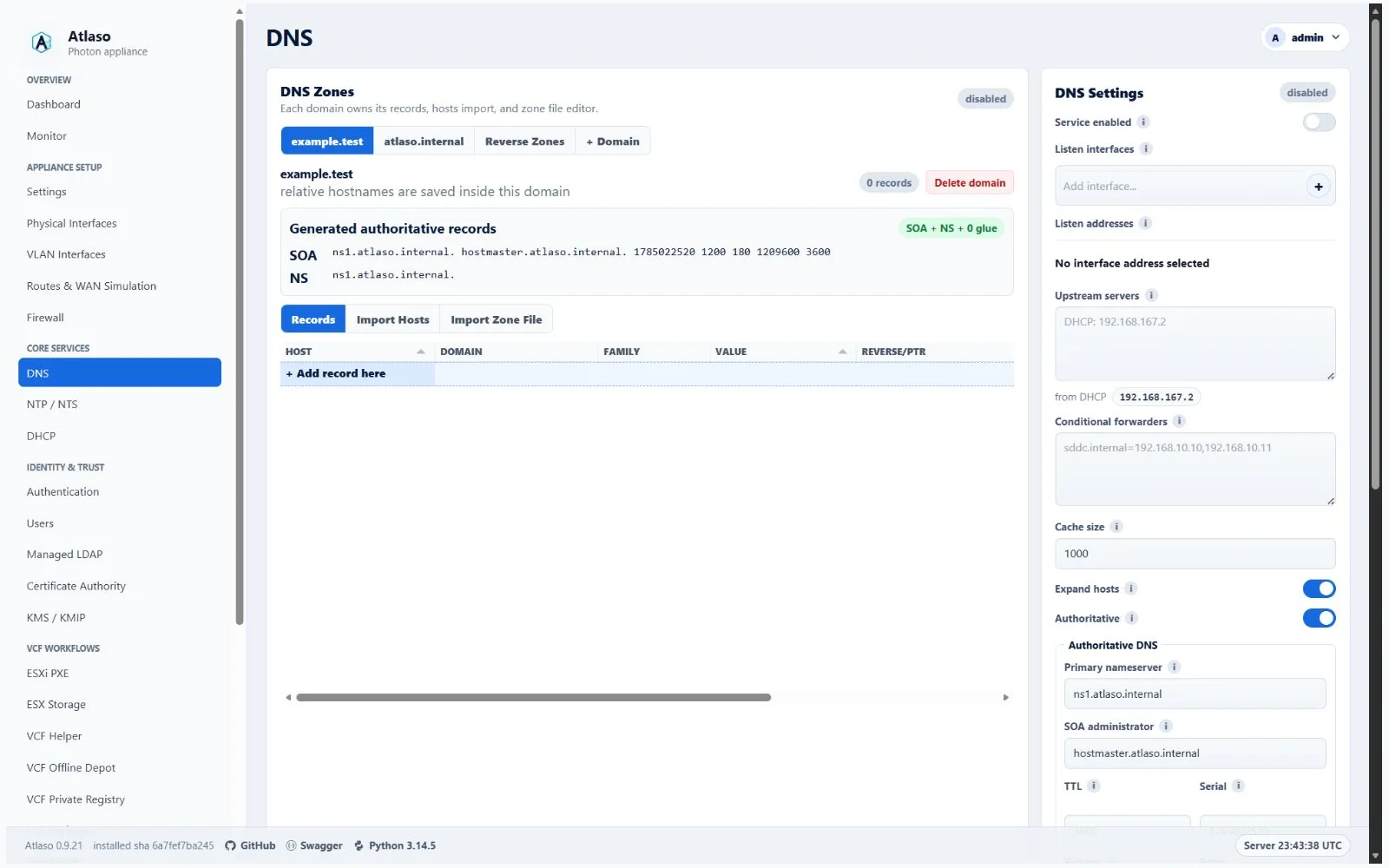
Figure: DNS desired state after a successful dnsmasq apply.
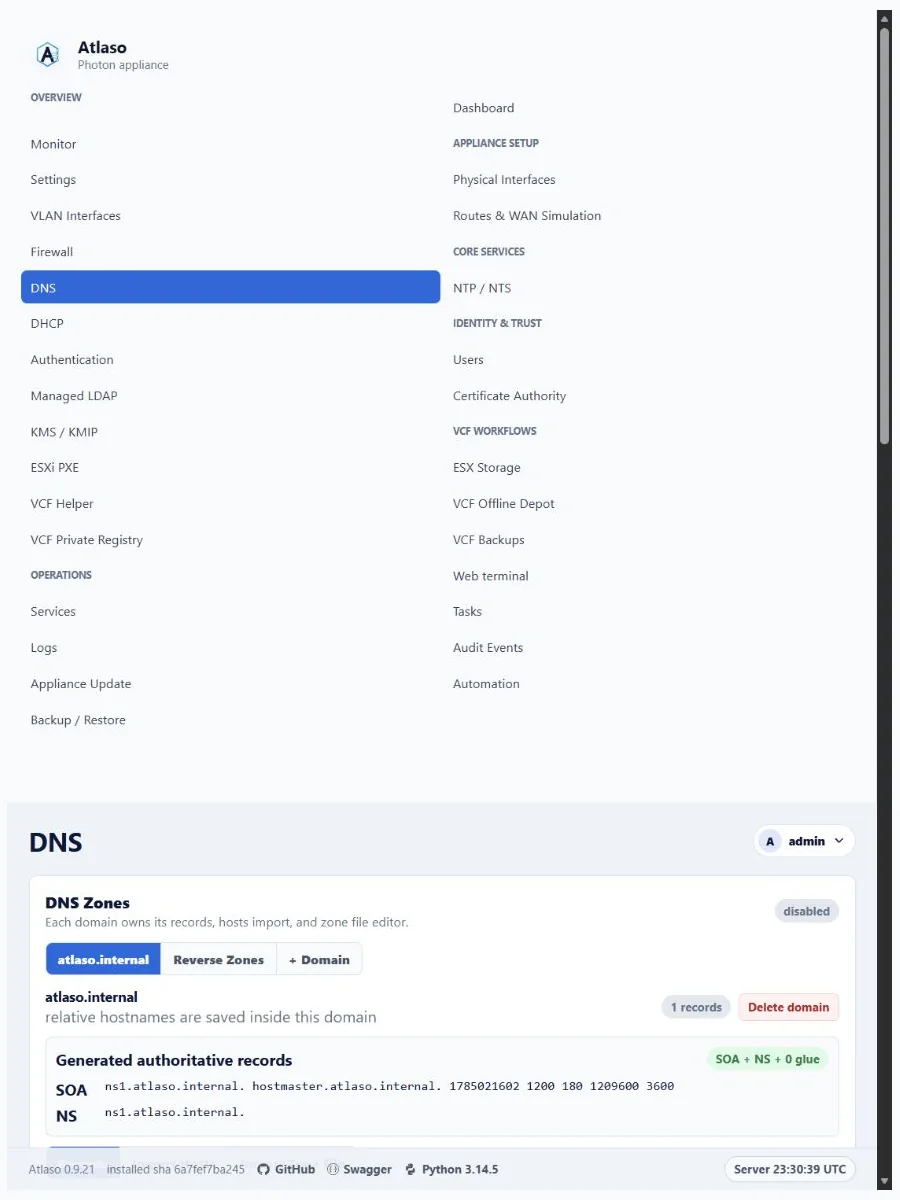
Figure: DNS in the verified clean-appliance responsive state.
Dns: Managed Domain
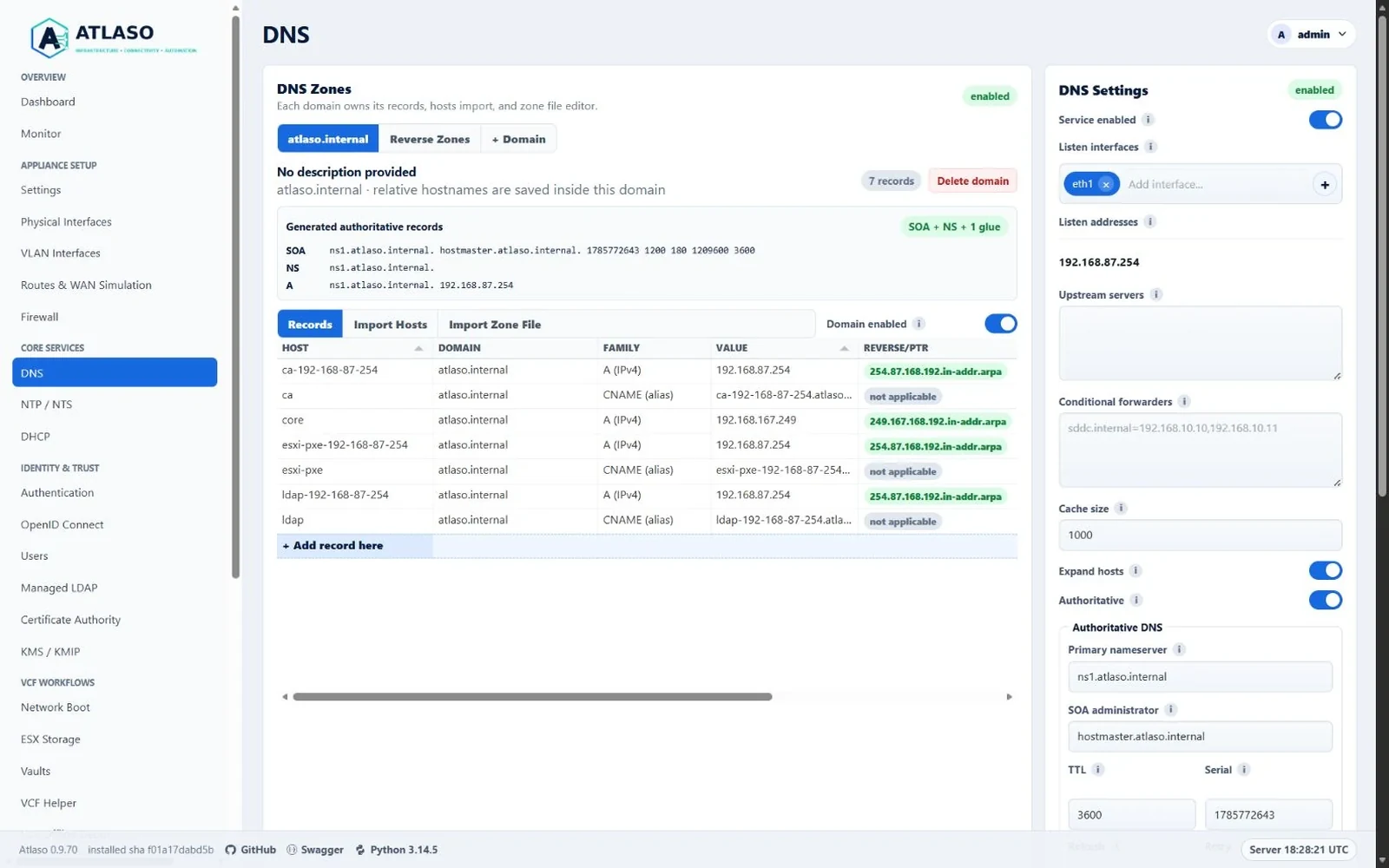
Figure: DNS domain tools with the Enabled switch beside the tabs and compact generated authoritative records.
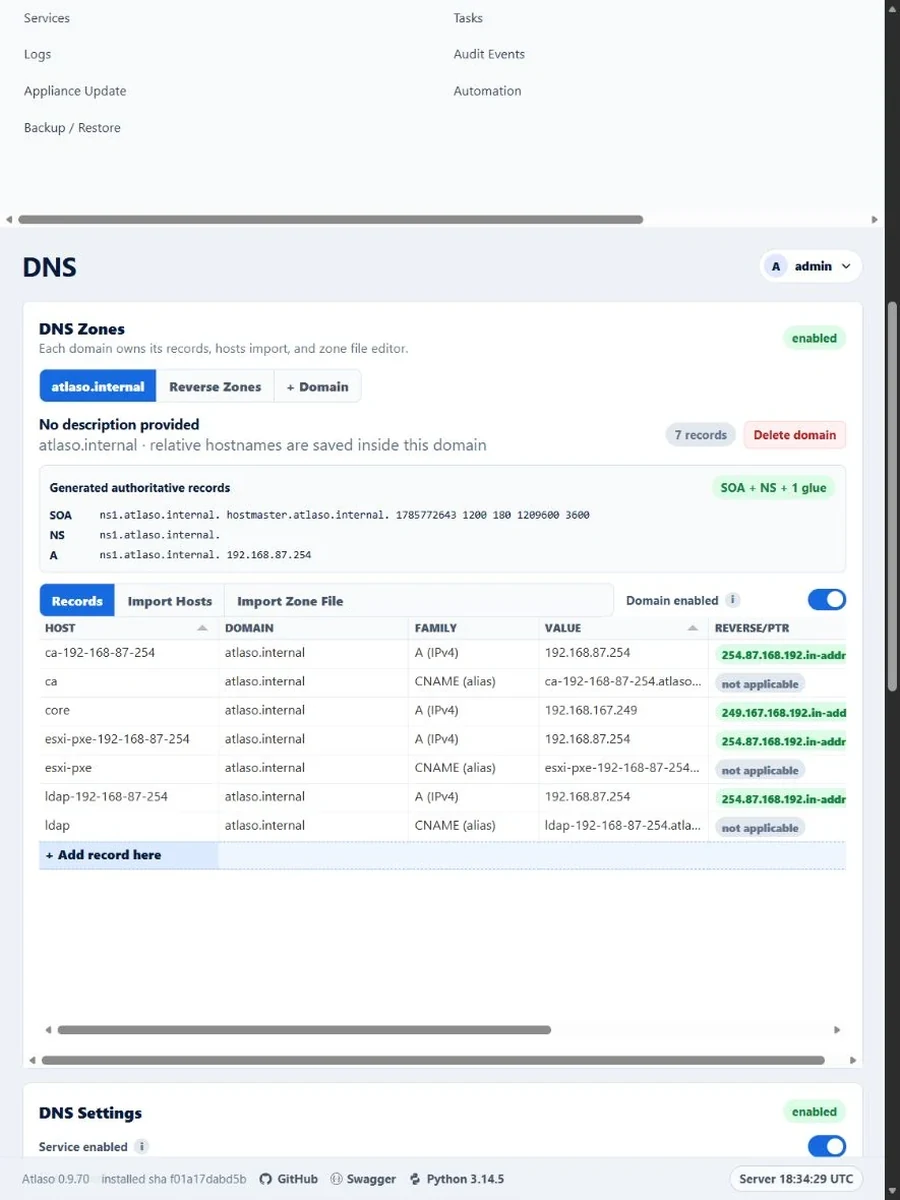
Figure: DNS domain tools in the verified narrow viewport.