VCF Helper
VCF Helper prepares deployment DNS desired state. It is available under VCF Workflows at
/ui/management/vcf-helper.
Interface overview
This verified appliance view provides visual orientation before you begin.
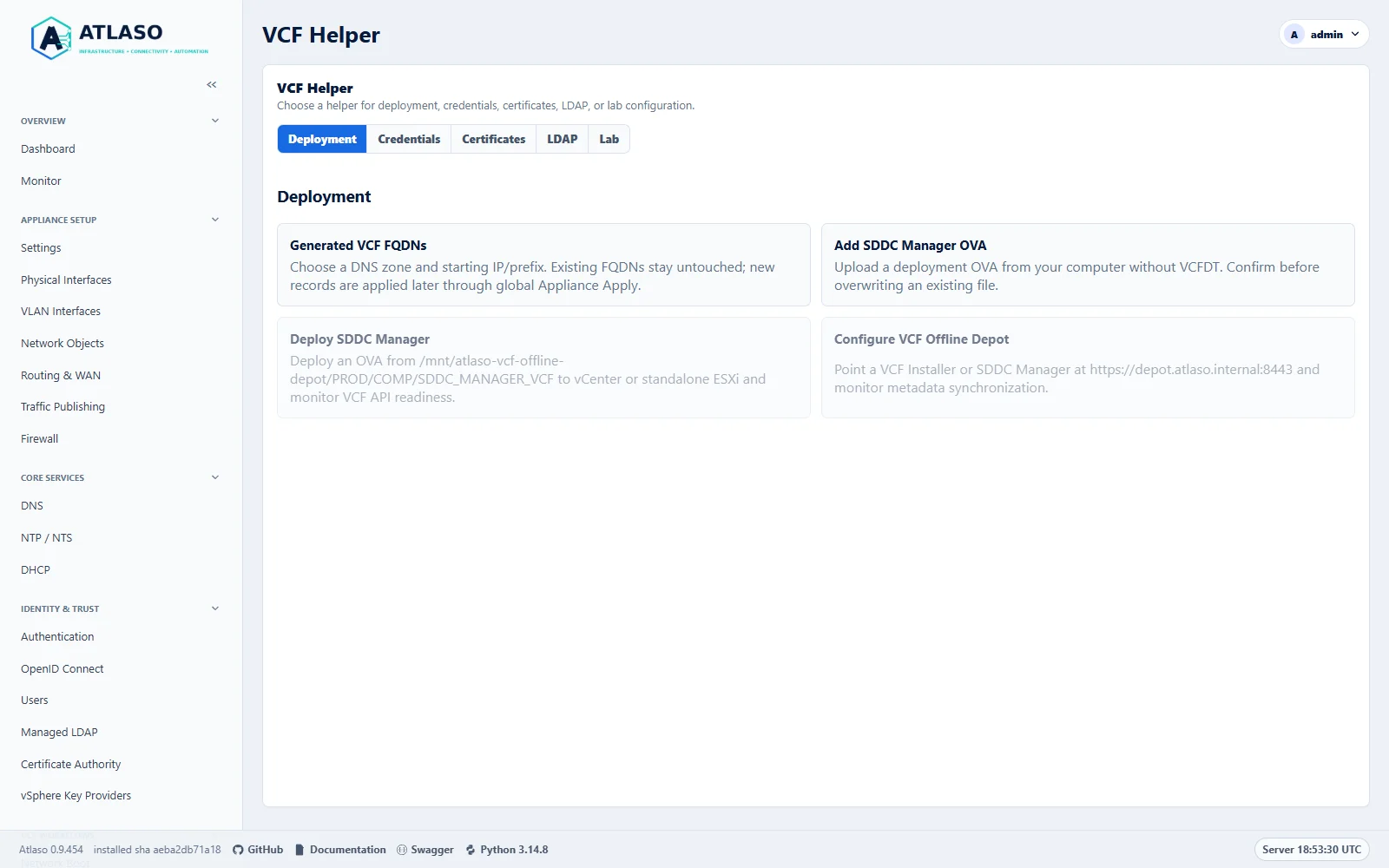
Figure: The Deployment tab groups related helpers on the dedicated lab appliance.
Choose a helper
Use the tabs inside VCF Helper to choose a workflow:
| Tab | Helpers |
|---|---|
| Deployment | Generated VCF FQDNs, Add SDDC Manager OVA, Deploy SDDC Manager, Configure VCF Offline Depot |
| Credentials | Import passwords into a vault |
| Certificates | VCF Certificate Trust, Appliance Certificate Replacement, Certificate Renewal |
| LDAP | Managed LDAP for VCF, Generate LDAP Test Directory |
| Lab | Lab / Non-production Overrides |
The page opens Deployment on the first visit and remembers your selected tab. Workflow links and returned results open the relevant category. Closing a dialog returns focus to its launch action. Use Left/Right Arrow, Home, and End on the tabs to navigate with the keyboard. Without JavaScript, the page displays all helper groups.
Appliance Certificate Replacement
Administrators can replace the certificate on a standalone vCenter, an unregistered standalone SRM / Protection and Recovery appliance, or the SDDC Manager appliance resource in its own initialized VCF 9.x management domain using the native CSR and private key. Open Certificates → Appliance Certificate Replacement. The wizard guides you through Credential, Server, TLS fingerprint, Login (manual credentials only), Target and prerequisites, Prepare certificate, Review, Replace, and Results. For SDDC Manager, Atlaso targets only its own management-domain appliance resource. VCF Installer, uninitialized appliances, and other domain-managed components are excluded. Linked vCenters, vCenter HA, registered SRM, unknown topology, and unsupported capabilities require the coordinated native product procedure.
The current certificate SANs and native hostname determine the read-only reviewed names. Correct native identity and DNS before preparation; Atlaso refuses stale/missing target SANs rather than silently substituting names. A ready CA and an enabled exact product profile must already exist. The replacement private key remains on the target. Recovery acknowledgement, no-pending-operation acknowledgement, and final certificate installation each require explicit operator action. Reviews are single-use, actor-bound, and expire after ten minutes. Requests have a 30-second bound and readiness checks can continue for up to 15 minutes.
If a task outcome is uncertain, use Reconcile status and follow the displayed recovery guidance. The target reservation remains held while remote state is unresolved. Do not create another CSR or repeat an uncertain install. For certificate requirements and the verified 9.1 lab coverage, see Appliance Certificates.
Certificate Renewal
Certificate Renewal provides an experimental Atlaso-managed renewal workflow for vCenter Machine SSL on the VCF Operations 9.1.1 contract. Native appliance acceptance is pending. This workflow does not change VCF Operations' own Auto Renewal status. Other certificate roles, VCF Operations 9.1.0, linked vCenters, vCenter HA, unsupported topology, root rotation, and STS identities are outside this first supported target.
The source contract is the repository's locked vcf-sdk==9.1.1.0, specifically its Operations fleet certificate,
CSR, workflow and version models. The client validates the numeric version and required response capabilities;
missing or ambiguous target and request identities stop the operation. Broadcom's
external-chain replacement API
documents EXTERNAL_CA, a public PEM chain, and an asynchronous workflow response. That page is unpinned latest;
it does not establish availability or successful behavior on an installed build. No VCF 9.1.0 compatibility is inferred.
Start in VCF Helper → Certificates → Certificate Renewal. The certificate list is read-only: use it to inspect target identity, issuer, expiry, renewal state, last and next attempt, and task history. The task link selects the newest bound scheduled check, manual check, or certificate operation, including failed checks. The shared Tasks view holds workflow progress and results; the certificate row reports the current per-target state.
Scheduled discovery rechecks the enrolling administrator's access. Explicit preparation and replacement tasks recheck the approving administrator instead, so another authorized administrator can prepare a proposal after the original enrollment owner loses access. If an approver loses access before dispatch, the task fails with a recoverable checkpoint. After that approver is authorized again, Reconcile status unwinds undispatched work without repeating certificate writes; preparation can then be reviewed again.
To enroll a target, confirm the VCF Operations HTTPS fingerprint and select its saved Vault credential. Also independently compare the target vCenter's displayed observed TLS fingerprint with a trusted source and confirm that exact fingerprint. Select a separate saved Vault credential for the target vCenter's authenticated read-only checks. This credential is used only for native permissions, topology, DNS, time, and health inspection before and after replacement. It does not authorize or perform CSR generation or certificate replacement; those writes use the VCF Operations APIs. Both credential selections are required. Enable Atlaso-managed renewal for the selected vCenter Machine SSL certificate; enrollment defaults off. Set the renewal threshold (30 days by default) and schedule (daily at 02:00 UTC by default, with a configurable cron schedule and timezone), then save the policy. Confirm the target and policy in the read-only certificate list.
After an Operations password rotation or TLS certificate change, select the Saved Operations connection and choose Reconfirm connection. Select its current Vault credential, verify the same server and port, independently confirm the freshly observed TLS fingerprint, and save. Atlaso authenticates before updating that existing connection; it does not rebind the enrolled targets or repeat native requests. Pending or running certificate write tasks must finish first. Prepared and recovery operations retain their checkpoints and reservations, and any prepared replacement requires a fresh review after reconfirmation. Use Reconcile status to observe a retained native workflow.
If the separate vCenter health password rotates, use the target row's Reconfirm health access action. Select its current saved Vault credential, read the target fingerprint, independently confirm it, and authenticate. The endpoint stays bound to that vCenter; only the enrolled leaf or the exact issued replacement is accepted, with strict TLS for the replacement. This read-only authentication repair does not require a ready CA/profile or green health, does not repeat certificate writes, and preserves retained material and native request checkpoints. A pending or running write task must finish first, and prepared replacements require a fresh approval afterward. Reconcile an existing native request rather than starting another replacement.
To stop scheduled checks, choose the certificate row's Disable enrollment action. Disabling uses only the saved local policy and its schedule, so it remains available during a VCF outage or when the CA/profile is disabled. Saved target, credential, profile and timing bindings are retained; disabling does not apply other wizard edits. A proposal can be cancelled this way, but an already prepared, running, or uncertain renewal must be finished or reconciled first.
Scheduled and per-target workflow checks read fleet metadata but probe only the enrolled target's TLS endpoint. This avoids repeating unrelated target timeouts during checks, preparation, and replacement. Use Refresh inventory to explicitly inspect the whole fleet.
The schedule and Check now perform discovery and propose due work. They do not generate a CSR, sign a certificate, install a certificate, or replace VCF Operations' native scheduler. When renewal is due, an administrator starts the explicit workflow:
- Select Prepare renewal for the reviewed target. Acknowledge that the native VCF workflow will generate a fresh CSR and Atlaso will sign that request. The target retains its private key.
- Follow the preparation task. Resolve any prerequisite or validation issue before proceeding to replacement.
- When the issued replacement is ready, open Review replacement. This review is bound to the administrator, the exact target and certificate, and expires after ten minutes. Atlaso revalidates its issued-certificate record at review, approval, and immediately before dispatch; revoked, disabled, missing, or changed material is refused.
- Verify the review again and check Replacement approval. Approve replacement becomes available only after the current exact review finishes loading and approval is checked, even if you checked it while loading. Select Approve replacement to submit through VCF Operations' asynchronous EXTERNAL_CA certificate workflow. Closing the dialog or a failed approval clears that review; reopen it and approve the fresh review to retry.
- Follow the task to completion. VCF's certificate status of
NORMALis not a component-health result. Atlaso reports success only after a fresh strict-TLS connection serves the exact reviewed leaf and authenticated read-only checks against the target vCenter confirm health.
An uncertain native request or installation keeps its target reservation. Use Reconcile status and resolve the recorded task before starting another renewal. Do not issue another CSR or repeat a replacement while the prior native outcome is unresolved. Review upcoming expiry, the last attempt, task details and audit history to diagnose failures; resume only from the recorded recovery guidance.
A web-service restart leaves the independent renewal worker and its checkpoints running. After a worker restart, Reconcile status can restore a durably prepared certificate for review without generating another CSR or signing again. The retained target reservation stays in place until the separately approved replacement is verified.
Renewal policies and checkpoint state are stored on the appliance and excluded from settings archives. Restore
preserves uncertain operation and reservation records, but does not export or recreate renewal schedules or Vault
entries; after restore, reconcile outstanding operations and restore the required credentials before re-enrolling any
schedule. Restore does not trigger certificate writes. If the VCF replacement request ID is lost, the operation remains
needs_recovery even when the new leaf is visible: strict TLS alone cannot establish that VCF's coordinating workflow
is terminal. Follow the supported native vCenter recovery procedure and reconcile the workflow before resuming.
Atlaso-managed renewal and VCF-native auto-renewal have separate owners and statuses. A certificate imported or replaced outside this workflow is not evidence of Atlaso-managed enrollment. This experimental integration has not completed live VCF Operations 9.1.1 acceptance; see the certificate guide and the MSCA compatibility investigation. The Microsoft CA path is deferred to Release 1.1, issue #1053; no interoperability or vendor-support claim is implied.
Lab / Non-production Overrides
Administrators can manage either or both of these explicit properties on VCF Installer and SDDC Manager:
| Option | Property value |
|---|---|
| Allow non-HCL vSAN ESA devices | vsan.esa.sddc.managed.disk.claim=true |
| Disable 10GbE physical NIC validation | enable.speed.of.physical.nics.validation=false |
The only edited file is /etc/vmware/vcf/domainmanager/application-prod.properties. Unselected properties remain
unchanged. This is lab / PoC / non-production property management, not a certification or a guarantee that VCF
will bypass a particular check. It does not change operationsmanager, commission hosts, generate deployment JSON,
or disable other validation checks.
Version and support matrix
| Detected release | Target | Behavior |
|---|---|---|
| VCF 9.0.x | VCF Installer or SDDC Manager | Review and manage the two fixed domainmanager properties. |
| VCF 9.1.0 | VCF Installer or SDDC Manager | Same explicit property management. |
| VCF 9.1.1 and later 9.1.x patches | VCF Installer or SDDC Manager | Same explicit property management, with a native ESA warning. |
| Other, missing, or ambiguous versions | Any | Unavailable; no guessed configuration changes. |
William Lam's VCF 9.0.1 reference describes legacy ESA properties and separate NIC validation behavior. Its update points to native ESA handling in VCF 9.1.1. Broadcom KB 408300 documents different property-file and component combinations for specific workflows. Atlaso deliberately edits only the file named above, as reviewed by the operator; it does not substitute a different path or claim that this covers every VCF workflow.
Review and apply
- Open Lab / Non-production Overrides and choose saved Vault credentials or a one-time manual login.
Saved credentials require a vcf SSH/SFTP identity and a separate root identity for the same host and port.
Python 3.10 or newer,
su, andsystemctlmust be available. No VCF API login is needed. - Review the saved SSH endpoint, or enter the hostname and SSH port for manual login.
- The Fingerprints step automatically probes the SSH identity without credentials. Verify the displayed fingerprint out of band and select the confirmation checkbox. Changed endpoints clear confirmation. SSH host keys are checked before authentication. If probing fails, go Back and return to retry.
- Saved credentials skip Login with manual controls disabled. For manual login, enter the
vcfand root passwords after confirming trust. Passwords stay in request/process memory, never in Vault, review tokens, jobs, logs or audits. Closing the wizard or queuing the task clears its password fields. - In Changes, select Verify login and inspect properties. Atlaso runs
/opt/vmware/sddc-support/sos -vasvcfto detect the version, then reads the fixed properties and service state. Readable inspection never resolves or sends the root secret. A permission refusal starts a separate pinned SSH exchange for a root-only read throughsu. The root secret travels over encrypted SSH stdin into a private, non-echoing terminal only for elevation; never through command arguments, files or output. - Each setting shows its actual current value. Choose True, False, or Not configured for the desired value. Not configured removes the explicit property. Choose Next to review the target, release, current and desired values, and restart requirement. Navigation and review never write properties or restart services.
- Acknowledge the lab-only warning and choose Apply reviewed changes. The signed review expires after ten
minutes and binds the operator, credentials, SSH identity and inspected configuration. Changed inputs invalidate
review. Manual credential bindings are removed before the task plan is stored. Apply rechecks the configuration
and service activity under a remote lock, refuses inactive
domainmanager, and usessufor writes and restart. - After successful submission, the wizard closes and opens the new task details automatically.
Closing the wizard while submission is pending does not cancel the authorized task; its successful response
still opens task details. Changed values trigger only
domainmanagerrestart; matching values need no restart. Property readback and service activity are reported separately. There is no API readiness check. Authentication, host identity, elevation, timeout and property failures are sanitized without terminal output.
Atlaso preserves unrelated file content, ownership, permissions and extended attributes. It accepts a regular
application-prod.properties file or the exact sibling alias application-prod.properties -> application.properties.
The alias remains intact; edits atomically replace its regular target. Review binds both identities and content.
Other links, linked parent directories, hard-linked configuration and competing operations on the same pinned
SSH host/port are refused. Restart is bounded to 90 seconds and service readiness to 180 seconds.
Verify the intended VCF workflow separately on the lab appliance; property readback is not acceptance evidence.
Adjusting values and interrupted tasks
There is no previous-operation rollback selector. Inspect the current settings again and submit the desired values through the same review flow. Task details retain previous and desired values for reference. If connectivity fails during mutation, reconcile the actual remote state before another operation. An interrupted worker retains its target reservation until maintainer recovery reconciles it. Never blindly resubmit an unknown outcome. Interrupted tasks record sanitized audits distinguishing undispatched work from unknown remote outcomes. Settings restore preserves local task provenance, reservations and consumed reviews; these are not desired state.
Browser-only operations are beneath /ui/management/vcf-helper/lab-overrides: POST probe, inspect, review
and execute, plus GET tasks/{job_id}. They require administrator authorization; mutations require CSRF, and
execution requires an acknowledged signed review. These remote tasks are separate from global Appliance Apply.
Audits record actor, target, version, previous/desired values and outcome without credentials or raw configuration.
Administrators can also use Import passwords into a vault for VCF 9 SDDC Manager and VCF Installer appliances.
The wizard chooses vault or manual credentials first, confirms the server second, and then opens a dedicated TLS page.
Atlaso probes the server without resolving or sending credentials and requires the operator to confirm the observed
fingerprint before vault or manual authentication can continue. The probe requires TLS 1.2 or newer, and explicit
fingerprint confirmation remains the trust decision rather than being replaced with ordinary CA verification. It
displays discovered metadata and safe skipped counts by reason for review; raw vendor errors and password values are
never shown. SDDC Manager discovery follows its documented all-records collection behavior and retrieves supported
listed passwords individually when the collection response omits or masks them. Installer discovery uses only the
latest available SDDC specification, so the results do not represent every appliance account. After selection, Atlaso
revalidates and re-fetches the reviewed values, then encrypts them in the selected vault. Source credentials are
request-local. Installer URI mapping follows the latest SDDC specification: vCenter root and each NSX manager root use
SSH to their named hosts, while vCenter SSO and NSX admin/audit use HTTPS to the specified vCenter hostname or NSX VIP
FQDN; NSX root never uses the VIP. Installer hostname fields accept validated short DNS names. A blank or omitted SSO
username uses administrator@<ssoDomain> when the domain is valid, otherwise administrator; Atlaso assumes no
default domain. Unknown endpoints require correction through the Vault entry's Edit action. See Vaults
for exact field mappings, SDDC Manager label validation, unsupported FTP endpoint association, and reimport,
managed-script, Kickstart, and restore behavior.
The helper creates DNS records in Atlaso, deploys SDDC Manager OVAs, and configures VCF 9 appliances to use the applied
local offline depot. DNS does not reload dnsmasq or change the appliance directly. Review and submit the changed
DNS/DHCP (dnsmasq) unit through the global /ui/management/appliance-apply workflow after generation or deletion.
The VCF Certificate Trust button opens the separate remote certificate task in a modal without mixing CA details into
the main DNS helper workspace. See VCF Certificate Trust.
Use a saved vault credential
An administrator can select Vault and then Key anywhere VCF Helper requests a remote vCenter, ESXi, SDDC Manager, VCF Installer, or VCF Automation login. Atlaso fills the server from the HTTP or HTTPS URI selected for the entry and fills its username. The server control is read-only, the manual-login controls are disabled, and the login page is skipped. The picker omits keys without an HTTP or HTTPS URI and shows one choice per valid URI when a key has several. If the selected vault has no usable keys, it shows No HTTP/HTTPS credentials available and keeps manual mode active.
Address fields display only the selected hostname, IP, and non-default port; they do not display http:// or
https://. Fields explicitly labeled as a URL, such as VCF Automation URL, retain the complete URL.
The selected password is not loaded into the page, copied into the password input, or returned by an API. The disabled password input indicates that the stored value will be used. Atlaso validates that the key belongs to the selected vault, decrypts the password on the server for that request only, and records the use without recording the value. Choose Enter credentials manually to return to request-local username and password entry. Service administrators can continue to use manual credentials but cannot select administrator-owned vault entries.
Remote VCF wizards consistently use Credential, Server, TLS fingerprint, and Login as their first four steps. The TLS step is always pre-authentication. Workflow-specific selection and review pages follow it.
The picker is available for SDDC Manager deployment inventory, VCF Offline Depot configuration, VCF Certificate Trust, VCF password import source authentication, and Managed LDAP for VCF Automation. The local offline-depot HTTP password and OVA appliance passwords remain separate fields and are never filled from this picker.
Deploy SDDC Manager
Upload an OVA without VCFDT
Administrators and service administrators can select Add SDDC Manager OVA under SDDC Manager / VCF Installer.
Choose the original .ova file from your computer, review its filename, size, and destination, then select
Upload SDDC Manager OVA. The two-step wizard follows Add ESX ISO, but accepts deployment OVAs rather than
ISO boot images. JavaScript is required for the chunked upload. The limit is 16 GiB.
The final destination is /mnt/atlaso-vcf-offline-depot/PROD/COMP/SDDC_MANAGER_VCF/<original-filename>.ova, directly
inside the component folder without an extra version or upload directory. This matches the packaged VCFDT
application-prodv2.properties defaults and the
VMware Holodeck offline depot layout.
Keep the vendor filename; only letters, numbers, dots, underscores, and hyphens are accepted.
The wizard reports transfer progress, then shows validation while Atlaso checks the OVF, referenced files, and manifest checksums. Admission limits archive metadata to 8 MiB, 4,096 members, a 4 MiB OVF, and a 1 MiB manifest before using the deployment parser. OVA staging writes and disk flushing run outside the event loop so slow depot storage does not block management requests. After success, the page refreshes and Deploy SDDC Manager discovers the package in the same folder used by VCFDT. Uploading does not deploy a VM, enable the depot, or require global Appliance Apply. It does not require VCFDT, Broadcom credentials, or a software depot ID, and does not populate the metadata needed to serve a complete offline depot to VCF.
For an existing OVA, ESX ISO, or VCF Download Tool filename, Atlaso shows Overwrite existing file? before sending file bytes. Cancel keeps the original file; Overwrite replaces it only after validation succeeds. Confirmation is bound to the current file revision: if another upload changes it during transfer, select the file again and confirm the new warning. ESX ISO names use the same whitespace trimming for overwrite checks and final storage. A failed OVA audit commit restores the previous package. Optional audit refresh or operational logging failures after a successful commit preserve the published OVA and its durable success record. For invalid or truncated files, obtain the complete original OVA and retry. For storage failures, check depot free space and write access. Failed or disconnected uploads are removed from staging; a process interruption can leave a private staging directory outside deployment discovery, but never a partially uploaded selectable OVA.
Chunked browser uploads
Multipart and no-JavaScript media uploads may create a new filename but cannot replace an existing file without revision-bound overwrite consent. Use the browser confirmation flow to replace existing media. After publication, backup-link and caller-owned staging-file cleanup errors are logged without changing the upload result; cleanup still attempts each private link. ISO permissions are set before publication.
VCF Download Tool filenames are validated before chunk storage is reserved. Final chunk cleanup attempts every staged file; a handle-close error is logged without replacing the consuming endpoint result. Expiry sweeps and shutdown also attempt every eligible handle after a close failure, and expiry continues for remaining sessions. Replaced OVA backup links are removed with private staging in the shielded worker cleanup, so old-file deallocation does not block management requests.
Browser file uploads use a shared sequential transport, including SDDC Manager OVA, ESX ISO, VCFDT packages, Network Boot media, credential files, registry CA bundles, and backup imports. Each request carries at most 8 MiB; small files use one chunk. Hashing supports both HTTP and HTTPS management pages. This works with the existing management proxy limit without applying Appliance Settings. Successful finalization retains the shared pending-changes sidebar refresh; staging reservations, chunks, and cancellation do not trigger extra status requests. Progress counts acknowledged bytes. A failed chunk retries up to three times with the same offset and SHA-256 checksum; already acknowledged chunks are not resent. Atlaso rejects changed retries, gaps, and size overruns. OVA filenames are validated before reserving a session, so unsupported names transfer no file bytes. Archive members and their total logical size are each limited to 16 GiB before manifest hashing, including sparse disk members whose logical size exceeds their physical archive size. Manifest entries must reference unique regular files, and total hashing work is bounded by the same limit. Final validation and publication use the existing endpoint, permissions, duplicate policy, and desired-state boundary. A lost final response is not retried automatically: inspect the destination before submitting again.
The OVA wizard locks Back, Cancel, step navigation, and Escape during transfer and validation.
A staging cleanup error after successful publication and audit does not turn the completed upload into a failure.
Keep the page open during transfer and validation. Sessions expire after 30 minutes without an accepted chunk;
page reload, logout, application restart, or exhausting retries requires selecting and uploading the file again.
Browser completion or failure releases staging in a worker thread, including when finalization is canceled,
so closing large temporary files does not block management requests. Rejected OVA staging directories also
use shielded worker-thread cleanup. Abandoned sessions expire automatically.
Files up to 16 MiB stay
in memory, so credential-file contents never enter chunk staging on disk. Larger files use private anonymous
files beneath /mnt/atlaso-vcf-offline-depot/.atlaso-uploads, outside artifact discovery. The depot volume must be
available and staging must not be writable by other users. The service reserves capacity for upload and validation,
with at most four sessions per browser, sixteen per process, and 32 GiB of total declared file sizes. Existing
file-specific limits still apply (including the configured ESX ISO limit); VCFDT packages are limited to 2 GiB,
LDAP recovery archives to 1 GiB, and credential/CA files to 1 MiB in this browser transport.
The browser protocol is excluded from OpenAPI: POST /ui/management/uploads/chunks creates a session,
PUT /ui/management/uploads/chunks/data appends a checked chunk, and DELETE on that same data route cancels it.
All operations require a current browser session and X-CSRF-Token. Session identifiers travel in headers,
not URLs. Finalization sends a bounded form envelope with X-Atlaso-Chunked: 1 to the original upload endpoint.
Existing multipart API clients and server-rendered fallback forms remain compatible; they do not gain automatic
chunk retries. Local file imports into text editors remain editor operations rather than binary file uploads.
Deploy a validated package
Deploy SDDC Manager becomes available when a valid OVA is present beneath
/mnt/atlaso-vcf-offline-depot/PROD/COMP/SDDC_MANAGER_VCF. Atlaso validates the OVA manifest, reads its
user-configurable OVF properties, confirms the vCenter or ESXi TLS fingerprint, and asks the selected target to parse
the OVF descriptor. VMware's parsed properties, defaults, deployment options, errors, and sanitized warnings are the
authoritative import contract. Atlaso reviews and passes a value for every target-deployable property. A direct
standalone ESXi connection is bound to its single host; vCenter retains automatic placement unless an operator selected
a host. Atlaso then streams the disks through a vSphere NFC lease.
Before power-on or any DNS, trust, or depot follow-up, Atlaso verifies every reviewed OVF value. With vCenter, the
imported VM must retain its vApp properties and a supported declared transport (com.vmware.guestInfo or iso).
Standalone ESXi discards vApp configuration during import, even when its generated import specification contains the
properties. For that target, Atlaso installs an escaped OVF environment in the exact powered-off VM's
guestinfo.ovfEnv setting and reads it back before allowing power-on. The OVA must declare com.vmware.guestInfo.
The environment includes a PlatformSection before its properties, identifying VMware ESXi, the connected target's
version and vendor, and the en locale. Readback verifies this platform metadata and section ordering as well.
Guest keys retain VMware's class and instance qualification, such as vami.ip0.SDDC-Manager, while reviewed empty
values and non-editable appliance defaults are preserved. A missing, malformed, duplicated, or changed environment
fails verification; the absence of ESXi vAppConfig alone is expected.
Standalone import warnings are redacted against both reviewed values and the additional non-editable defaults.
Values are redacted before whitespace normalization or truncation. Standalone parser diagnostic text is withheld
because the parser can omit defaults revealed only by the later import specification.
Failed standalone import specifications may omit property metadata, so their vendor diagnostic text is withheld.
Cancellation during metadata work is checked before either powered-off completion or power-on.
VMX responses enforce one 30-second deadline starting before the request, including headers, chunk framing, and body.
Socket inactivity polls retry within that deadline and check cancellation without discarding buffered response bytes.
ESXi can expose an empty guestinfo.ovfEnv API value even though the VMX contains the complete XML. In that case,
Atlaso reads only the exact imported VM's configuration from the selected datastore over HTTPS, checks the certificate
against the confirmed fingerprint before sending its session cookie, and verifies the decoded XML in memory. The
deployment account therefore needs permission to read that VMX through the datastore browser. A refused read, changed
certificate, redirect, or invalid configuration fails verification and triggers the same rollback. Results identify
this readback as datastore-vmx; no configuration file or property values are saved in task logs.
If cancellation arrives during metadata installation or readback, Atlaso finishes that verification but checks
cancellation again before starting power-on. The verified VM remains powered off and is reported as a partial deployment.
If installation or verification fails, Atlaso removes only the exact VM created by that task. A failed removal is reported as a partial deployment requiring manual cleanup. The pre-authentication fingerprint probe requires TLS 1.2 or newer while preserving explicit fingerprint confirmation as the trust decision. Atlaso refuses duplicate VM names and waits up to 90 minutes for the VCF API after a verified VM is powered on.
The form can optionally add managed DNS desired state, deploy Atlaso CA trust, and configure the local offline depot. Trust uses the VCF API only and does not require a snapshot acknowledgement. Manually entered vSphere, OVF, VCF API, and depot passwords remain transient; a selected vault password remains encrypted at rest and is resolved only on the server for the request.
Standalone ESXi acceptance check
Run this check in a lab that has the exact supported VCF Installer OVA and a directly connected standalone ESXi host. Use a disposable VM name and do not record credentials or OVF property values.
- Record the sanitized Atlaso version and Git SHA, OVA product/version identity, ESXi version and API type, selected deployment option, and OVF property key names.
- In Deploy SDDC Manager, confirm the ESXi TLS fingerprint, select the deployment option and destination, review every rendered property key, and deploy with power-on disabled first.
- Confirm the task reports
HostAgent, the selected deployment option, sanitized parser/import warnings, qualified property keys, and theguestinfo.ovfEnvverification source withcom.vmware.guestInfotransport. Compare the persisted environment privately with the reviewed mapping; never copy XML or values into the evidence record. - Power on the verified VM and confirm the VCF Installer consumes its OVF environment and becomes usable. Repeat the supported vCenter path as a regression check when a safe vCenter target is available.
- For a negative check, use a disposable controlled descriptor or test target that cannot retain the required transport. Confirm Atlaso powers on nothing, runs no DNS/trust/depot follow-up, and removes only the task-created VM.
Record only sanitized diagnostics and key names. Never capture passwords, vSphere credentials, private material, property values, or the complete VM configuration. If the lab result differs, attach the sanitized task diagnostics to issue #801 before approving the pull request. Powered-off import verification does not prove that the appliance consumed the environment; complete the real guest boot and readiness check as well.
Configure VCF Offline Depot
The standalone helper is available only when the local depot is enabled, applied, CA-backed, has a generated software depot ID, and has a selected HTTP user. Its wizard follows Credential, Server, TLS fingerprint, and Login before collecting the one-time depot HTTP password and reading the current sanitized depot configuration. The TLS probe runs before Atlaso resolves a selected vault password or reads manual login fields. After confirmation, Atlaso detects VCF Installer or SDDC Manager 9.x. Replacing a different depot requires explicit confirmation.
Atlaso calls PUT /v1/system/settings/depot, triggers metadata refresh with
PATCH /v1/system/settings/depot/depot-sync-info, and polls the matching GET endpoint for up to 60 minutes. It asks for
the local depot user's password for each run and never stores it. Certificate trust is not implicit; configure it
separately when the target does not yet trust the Atlaso CA.
Task details separate configuration readback from metadata synchronization failures. After a metadata error, request/observation failure, or timeout, Atlaso independently reads the target depot configuration and connection status. A verified configuration does not prove that compatibility metadata synchronized. Unavailable readback is explicitly unverified; it does not by itself mean the configuration needs changing. The manual-recovery flag is set only when readback demonstrates a mismatch or unsuccessful connection. This evidence is retained for standalone configuration and configuration during deployment, including when a sync endpoint returns an unusable JSON response.
The failure details include bounded pre-request and latest observed sync states and timestamps, whether the sync request was accepted, and whether an unchanged error and completion marker could describe a historical failure. HTTP acceptance is retained even if the response body is unusable; acceptance is unknown when transport fails before a response arrives. Retained configuration evidence excludes vendor URLs and free-form messages. Malformed nested configuration or account objects make the readback unavailable while preserving sync evidence. Nonfinite numeric values in the readback are likewise unavailable evidence. That historical-error indication is a diagnostic hint, not proof of the cause or a successful current sync. Existing synchronization and terminal status behavior is unchanged. Read current target sync status before retrying: a remote sync may still be active. Retrying against a matching depot preserves that configuration.
Generate FQDNs
Open Generated VCF FQDNs and select:
- the deployment catalog;
- an optional hostname prefix and suffix;
- a domain from the DNS zones managed by Atlaso;
- a starting IPv4 or IPv6 address with its CIDR prefix, such as
192.168.50.100/24or2001:db8:50::100/64.
The preview updates as the deployment, prefix, suffix, or domain changes. A generated hostname is formed as:
For example, prefix lab-, hostname vc01, suffix -mgmt, and domain example.internal produce
lab-vc01-mgmt.example.internal.
Each selected catalog component also has an editable Hostname in the review table. Prefix and suffix changes update rows that still use their generated defaults while preserving deliberate per-component edits. Changing the deployment catalog preserves edited hostnames for components that remain selected and initializes newly selected components from the current pattern. Clear pattern removes the prefix and suffix and restores every selected component to its catalog hostname.
Atlaso normalizes reviewed hostnames to lowercase and accepts exactly one DNS label per component. Labels must contain 1 to 63 letters, numbers, or hyphens and cannot begin or end with a hyphen. Every component in the selected catalog must appear exactly once, and two components cannot use the same reviewed hostname. The server derives each FQDN from the reviewed label and selected managed domain; it never trusts a browser-generated FQDN.
Select Populate to allocate and display the proposed A or AAAA addresses without changing DNS desired state. The hostname inputs use their component descriptions as accessible names without repeating visible labels in every compact row. Create DNS records remains disabled until Populate succeeds. Changing the deployment, domain, address range, prefix, suffix, or any reviewed hostname invalidates that populated revision and requires Populate again. Atlaso binds creation to the exact signed, time-limited populated inputs so a stale or changed browser submission cannot bypass the review. Create also recomputes current DNS and DHCP availability and rejects the request when its allocations or skips no longer match the signed plan, requiring Populate again instead of silently changing reviewed addresses. If inputs change while a Populate request is still running, Atlaso discards that superseded response and requires a fresh Populate instead of displaying or enabling an obsolete plan. Without JavaScript, Populate submits the same inputs to a server-rendered review stage. That response displays the planned allocation, carries the signed revision, and enables Create DNS records for the reviewed values. Planned rows remain incomplete even if the page was rendered with an address that was removed before Populate.
Creating records then requires confirmation. The modal remains open after creation so assigned addresses can be
reviewed. When every displayed FQDN has an A or AAAA address, the primary action changes to Done; Done closes the
modal.
Deployment Catalogs
The catalog is versioned so later VCF and VVF releases can define different component sets without changing existing selections.
| Hostname | Component description | VCF 9.1 | VVF 9.1 |
|---|---|---|---|
vc01 |
vCenter | Yes | Yes |
nsx01 |
NSX Manager cluster | Yes | No |
nsx02 |
NSX Manager appliance 1 | Yes | No |
nsx03 |
NSX Manager appliance 2 | Yes | No |
nsx04 |
NSX Manager appliance 3 | Yes | No |
ops01 |
VCF Operations primary node | Yes | Yes |
ops02 |
VCF Operations replica node | Yes | No |
ops03 |
VCF Operations data node | Yes | No |
collector |
Cloud Proxy | Yes | No |
auto-vip |
VCF Automation | Yes | No |
auto-platform |
VCF Automation Runtime | Yes | No |
sddcm |
SDDC Manager | Yes | No |
vsp01 |
VCF services runtime | Yes | Yes |
fleetlcm |
Fleet components | Yes | Yes |
shared01 |
Instance components | Yes | Yes |
vidb |
Identity Broker | Yes | No |
license |
License Server | Yes | Yes |
Address Allocation
An IPv4 starting CIDR creates A records. An IPv6 starting CIDR creates AAAA records. Allocation starts at the entered address and advances sequentially within that network.
Atlaso skips:
- addresses already used by DNS records of the selected address family;
- IPv4 addresses used by DHCP reservations;
- generated FQDNs that already exist as any DNS record type.
Existing FQDNs are never overwritten. Existing A and AAAA addresses are shown in the preview when available. If the remaining network cannot provide an address for every missing FQDN, allocation fails transactionally and creates no records.
Enabled managed-DNS reverse proxies reserve their hostnames even when authoritative DNS is off or does not serve their zone. If a generated FQDN claims one of these names, creation rejects the entire collection without adding records. Deployment DNS follow-up reports a conflict and preserves that name; the deployed VM is retained.
IPv4 network and broadcast addresses are not allocatable. The IPv6 network address is treated as the subnet-router anycast address and is not allocatable.
Record Ownership And Deletion
New records use the catalog component description, such as vCenter or VCF Automation, as the DNS record description.
Helper ownership is stored separately in structured record metadata with source vcf_helper, the immutable catalog
component key, and the reviewed generated hostname label.
Delete generated records is enabled only when at least one displayed FQDN has a currently persisted A or AAAA
address; proposed Populate addresses and stale page snapshots alone never enable deletion. Deletion requires
confirmation and submits the same exact
component-to-hostname mapping used by creation. Atlaso removes a record only
when its FQDN and helper metadata prove ownership for that submitted component and reviewed hostname. Unrelated,
manually created, mismatched, and legacy description-only records are preserved even when their names or descriptions
match the current catalog.
Routes And Responses
GET /ui/management/vcf-helperrenders the helper page.POST /ui/management/vcf-helper/generated-fqdns/populatevalidates and previews allocation without mutation.POST /ui/management/vcf-helper/generated-fqdnsvalidates and creates missing records.POST /ui/management/vcf-helper/generated-fqdns/deletedeletes matching helper-owned records.POST /ui/management/vcf-helper/sddc-manager/inventoryconfirms TLS and discovers vSphere inventory.POST /ui/management/vcf-helper/sddc-manager/ovas/uploadstreams an OVA after session, role, and CSRF checks.POST /ui/management/vcf-helper/sddc-manager/deployqueues an OVA deployment.GET /ui/management/vcf-helper/sddc-manager/tasks/{job_id}reports deployment progress.POST /ui/management/vcf-helper/offline-depot/inspect-targetpreviews remote depot state.POST /ui/management/vcf-helper/offline-depot/configurequeues remote depot configuration.GET /ui/management/vcf-helper/offline-depot/tasks/{job_id}reports configuration and sync progress.
Fetch and no-JavaScript form responses report the current edited FQDN set as created, skipped, deleted, or preserved rows with assigned addresses, plus validation or allocation errors. All mutations use the existing authenticated session, CSRF validation, audit logging, and DNS desired state model.
Connection failures distinguish hostname resolution, TCP connectivity, and TLS handshake/certificate retrieval. For an unresolved Atlaso-managed name, verify local DNS and host resolver configuration before retrying TLS confirmation.
Additional verified states
These captures show responsive layouts and useful operational states referenced by this page.
VCF Helper
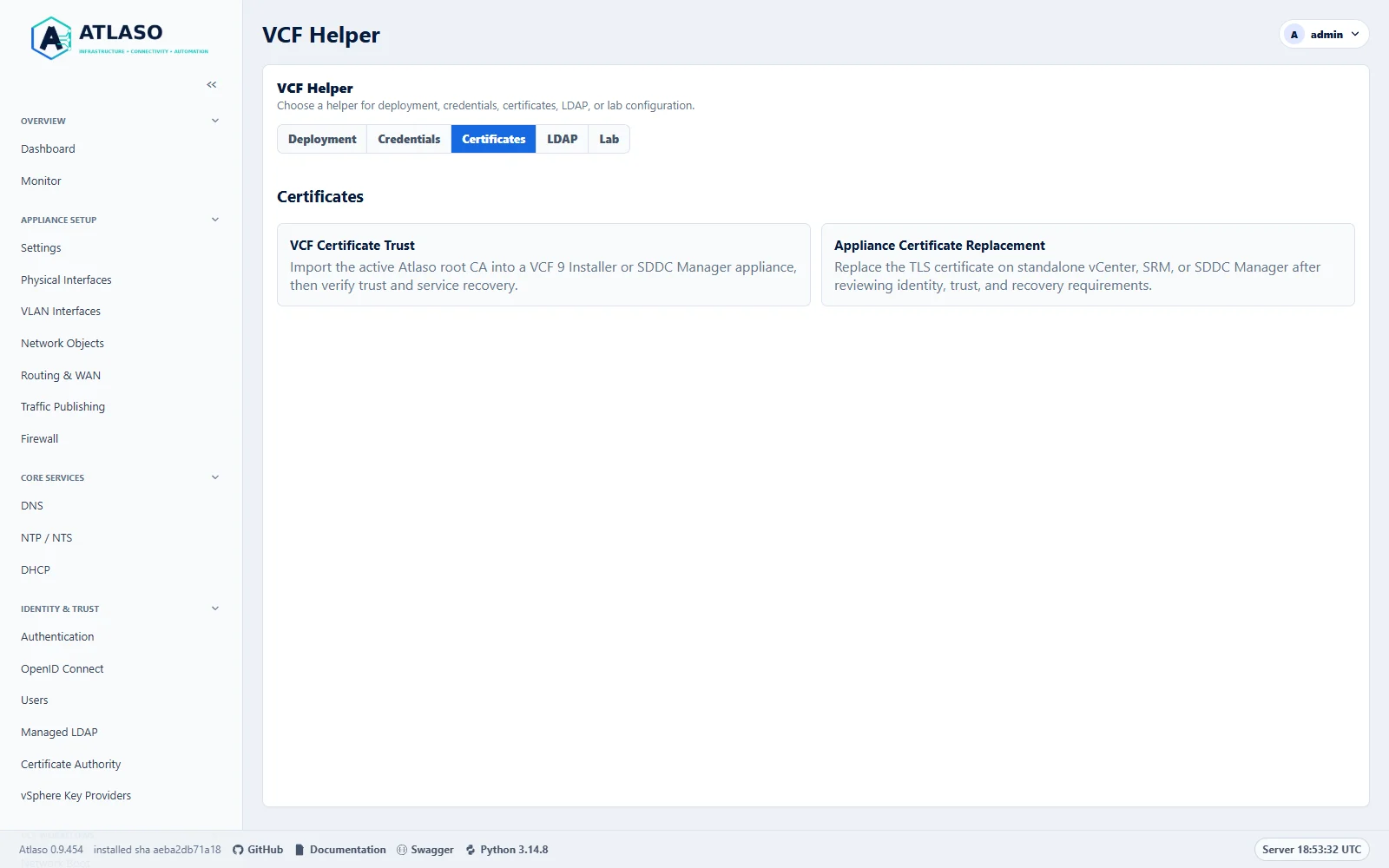
Figure: The Certificates tab groups related helpers on the dedicated lab appliance.
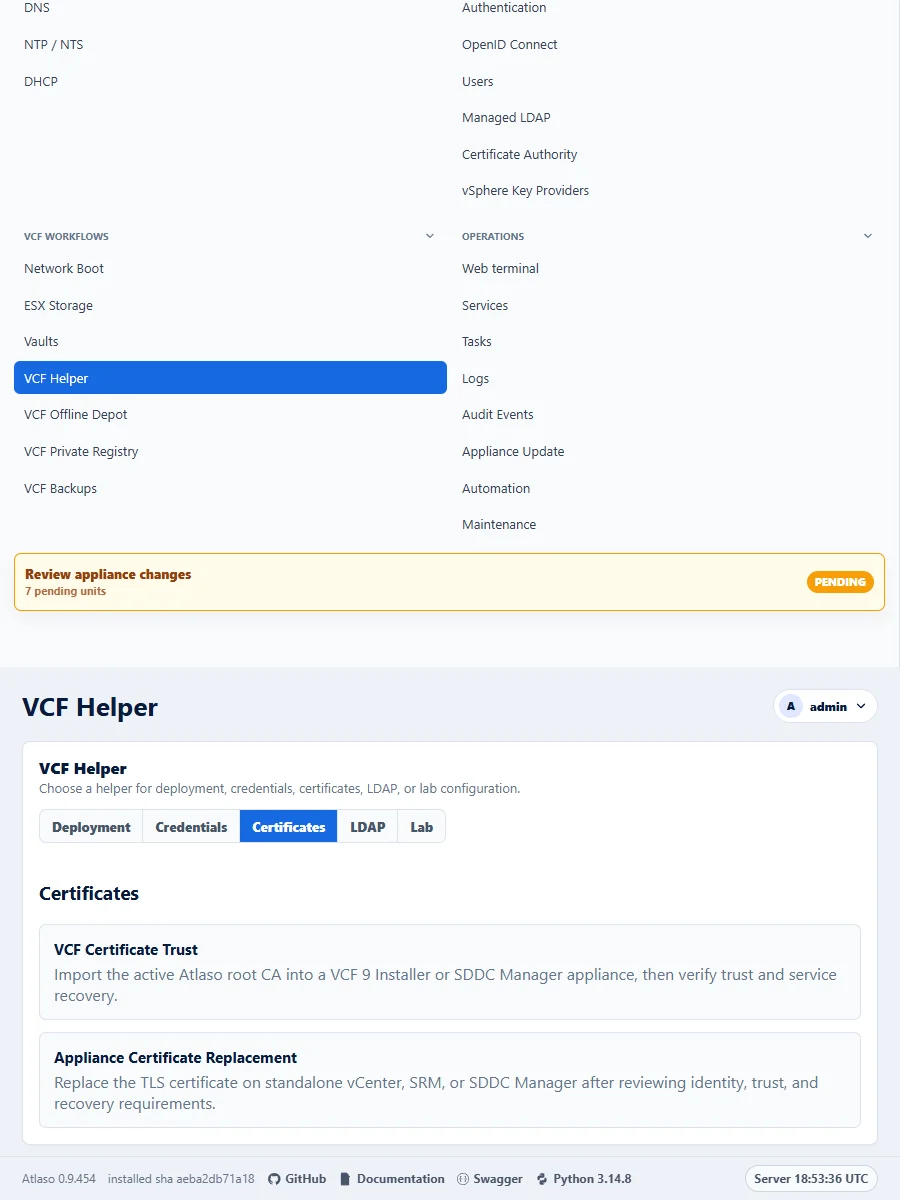
Figure: The Certificates tab groups related helpers on the dedicated lab appliance.